
We’re excited to announce Chandra 1.5, a major update to our OCR model that brings significant improvements across the board. This release focuses on better tables, higher accuracy overall, better formatting, new chemistry and diagram support, and faster processing times.
Try it now in our playground or sign up for API access.
Benchmark Improvements
Chandra 1.5 improces across all our benchmark metrics, with particularly strong gains in table extraction:
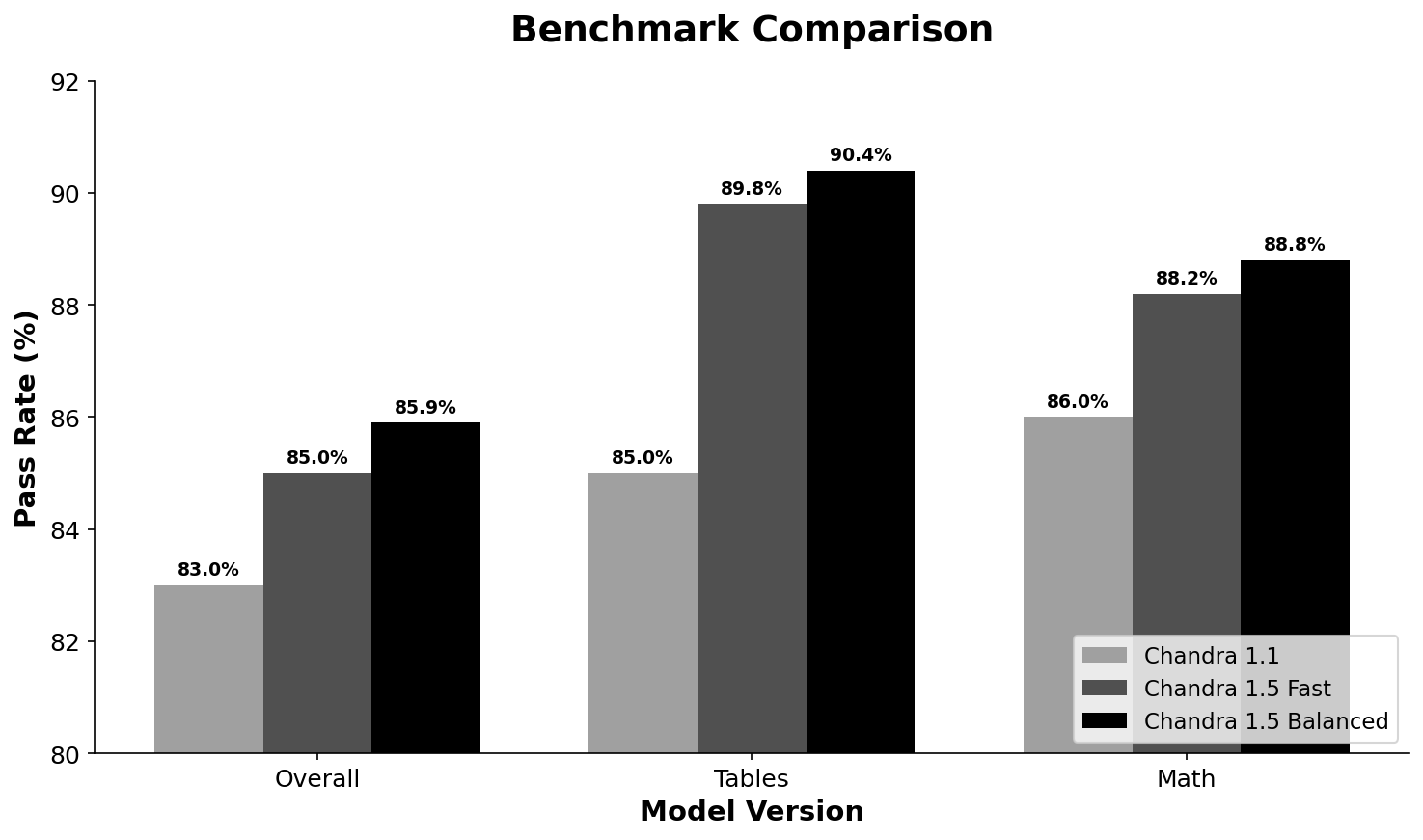
Benchmarks use the olmocr benchmark with additional data cleaning for model-specific formatting (filtering out <math> tags, etc.).
The most significant improvements are in table extraction, where we’ve seen substantial gains through better handling of complex table structures including colspan, rowspan, and blank cells.
Latency Improvements
We’ve made significant investments in reducing latency, especially for longer documents:
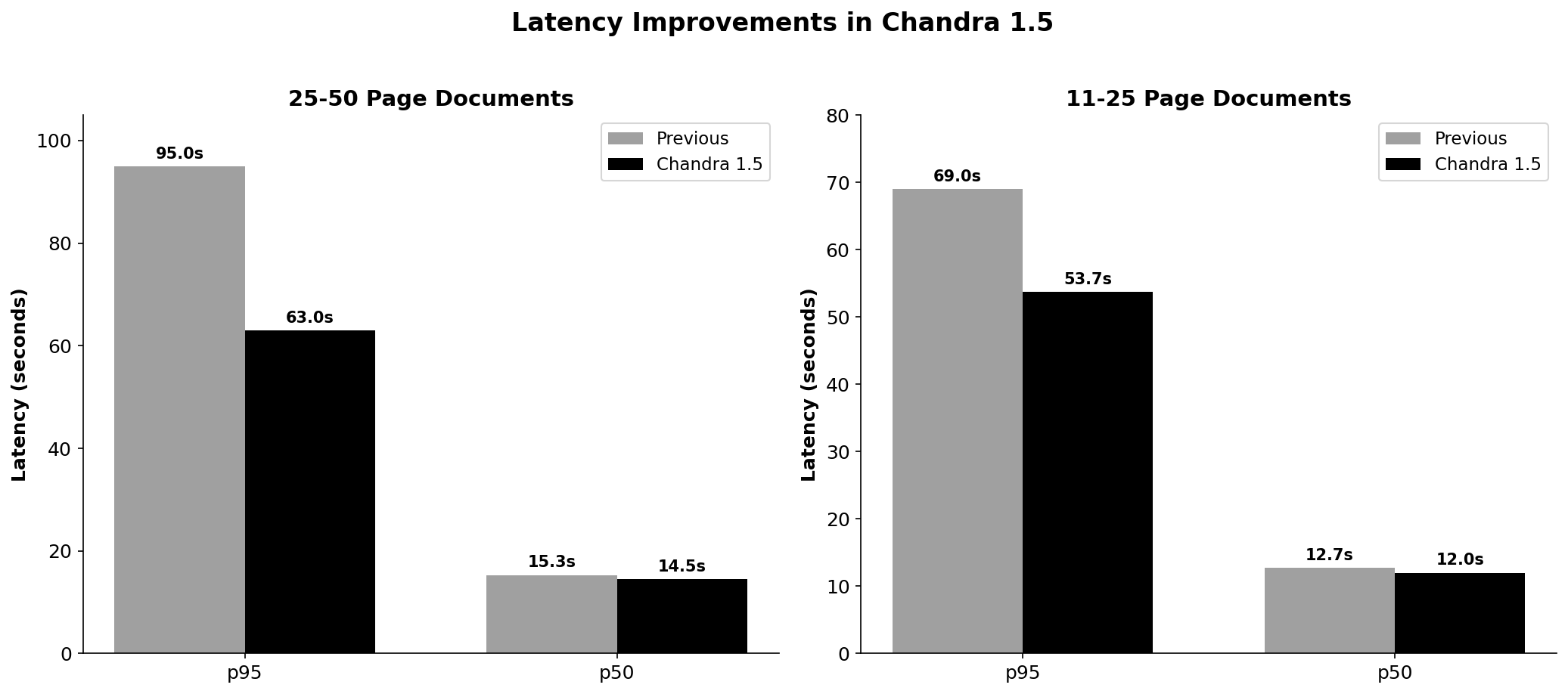
For 25-50 page documents, p95 latency dropped from 95s to 63s - a 34% improvement. Even median latency improved by 5-6% across document sizes. These improvements come from better batching and more efficient model inference.
New Features
We were able to add a lot of new features to the model. Here is a quick overview:
- Table Performance - Improved extraction of complex tables with colspan, rowspan, merged cells, and superscript/subscript notation
- Table Row Bounding Boxes - New table_row_bboxes extra that provides precise bounding boxes for each table row
- Nested Tables and Images in Tables - Support for complex table layouts with embedded images and nested tables (common in product catalogs)
- Chemistry Support - Chemical structure recognition with detailed molecular descriptions
- List Marker Preservation - Preserves exact list markers from source documents instead of normalizing them
- Diagram Support - Converts flowcharts and diagrams into Mermaid format
- Chart Understanding - Extracts data, titles, axis labels, and generates captions from charts and graphs
- Formatting Improvements - Proper detection of bold, italic, underline, and strikethrough text
- Redaction Handling - Outputs [REDACTED] placeholder for blacked-out or obscured content
Keep reading if you want to see these in action - all screenshots below were taken using balanced mode in the playground.
Table Performance
We’ve significantly improved table extraction through better handling of complex table structures. Here’s an example of a scientific table with merged cells and superscript notation:
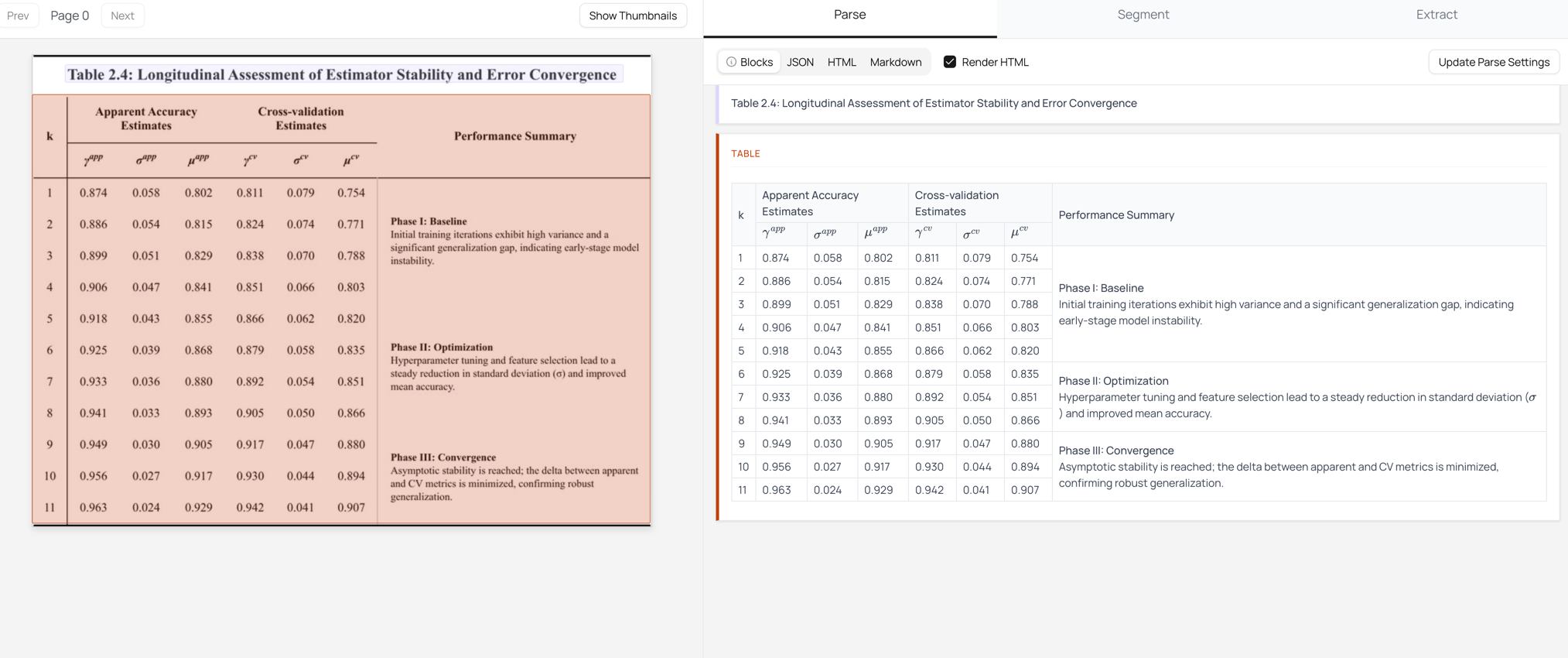
Chandra 1.5 correctly handles:
- Complex colspan and rowspan cells
- Multi-column headers with hierarchical structure
- Blank cells offsetting columns
Table Row Bounding Boxes (Beta)
We’ve added a new table_row_bboxes extra that provides precise bounding boxes for each table row. This is useful for applications that need to highlight or overlay information on the original document.
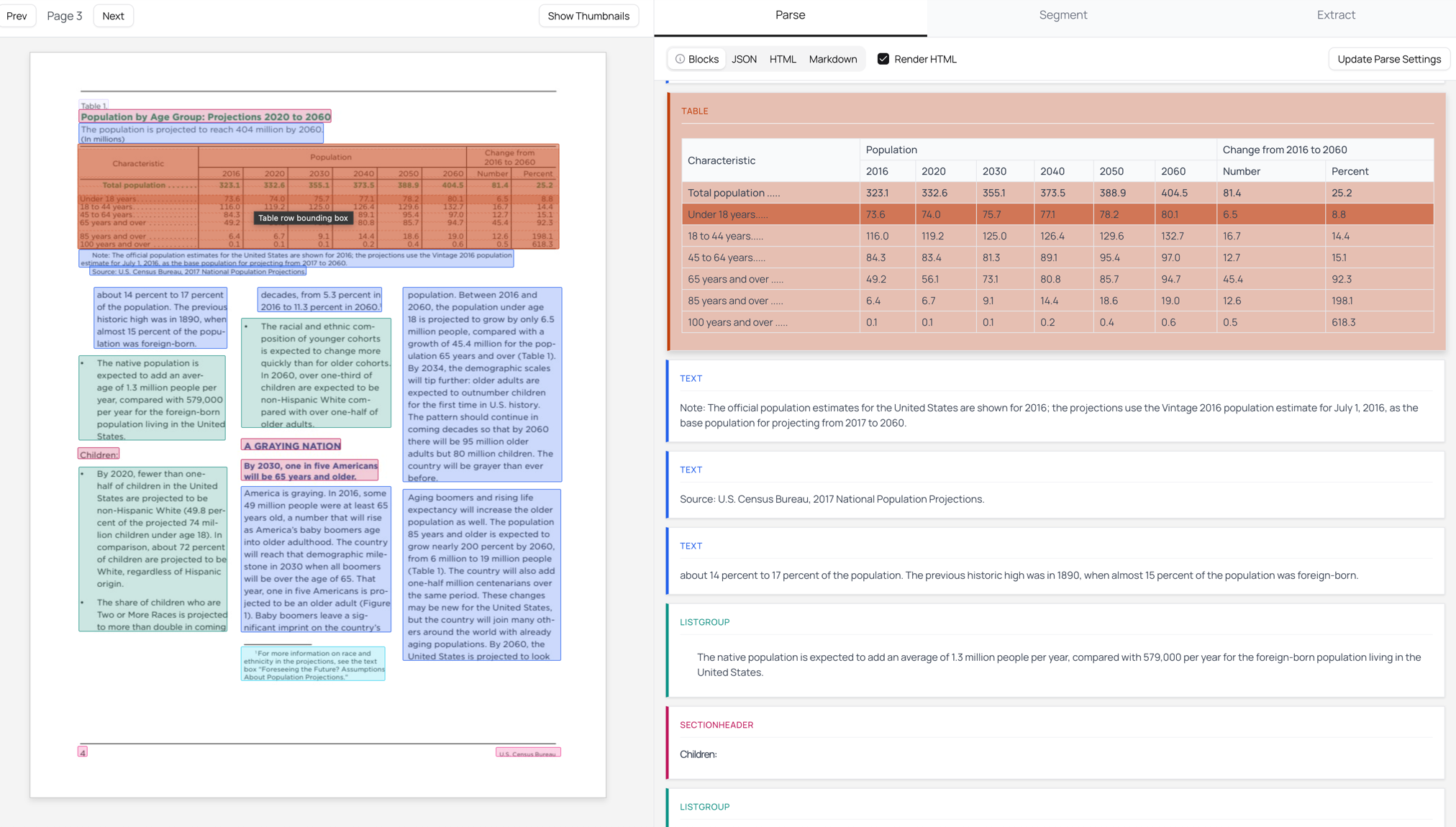
In the Playground: Click “Update Parse Settings”, expand “Additional Config”, and check “Table Row Bboxes”.
Via API: Add table_row_bboxes to the extras parameter:
curl -X POST "https://www.datalab.to/api/v1/marker"
  -H "X-Api-Key: YOUR_API_KEY"
  -F "[email protected]"
  -F "extras=table_row_bboxes"
Nested Tables and Images in Tables
Chandra 1.5 now handles complex table layouts with nested tables and embedded images. This is common in product catalogs, spec sheets, and technical documentation where images and structured data appear together in cells.
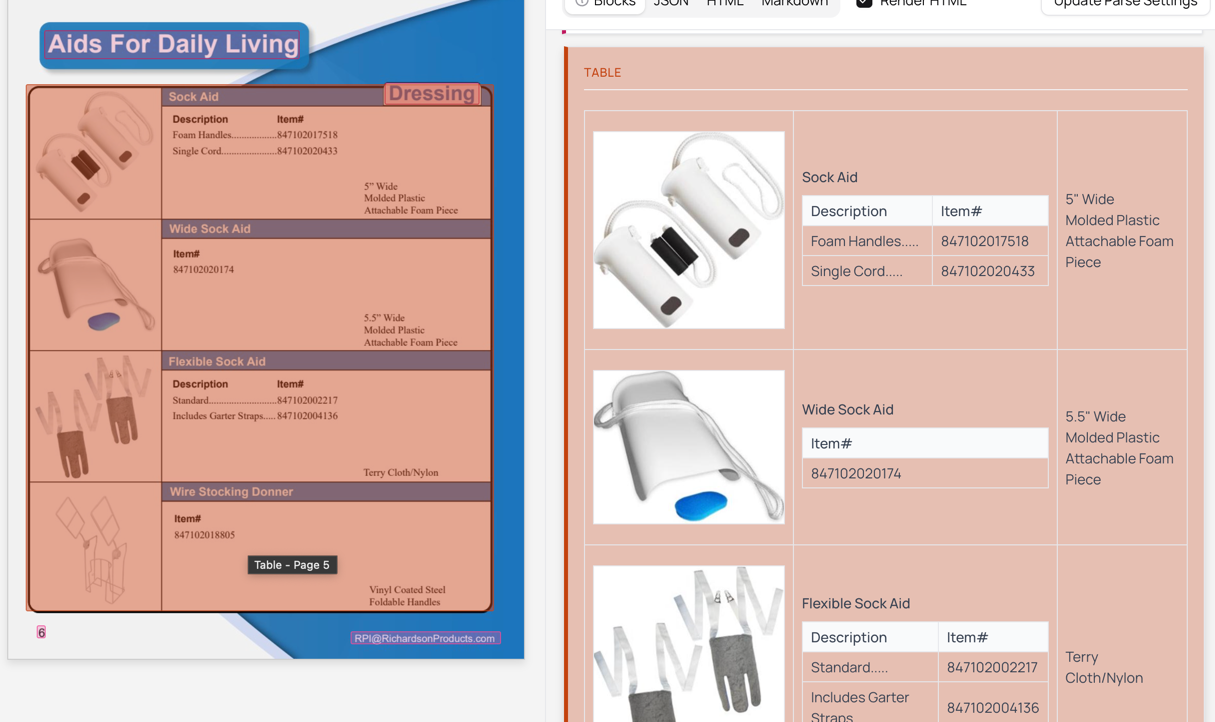
The model correctly extracts:
- Product images embedded within table cells
- Nested tables containing descriptions and item numbers
- The hierarchical relationship between parent and child tables
- Text content alongside images in the same cell
Chemistry Support
Chandra 1.5 introduces chemistry support for chemical structure recognition. When we detect chemical structures in documents, we extract the images, and generate detailed descriptions of the molecular structure.
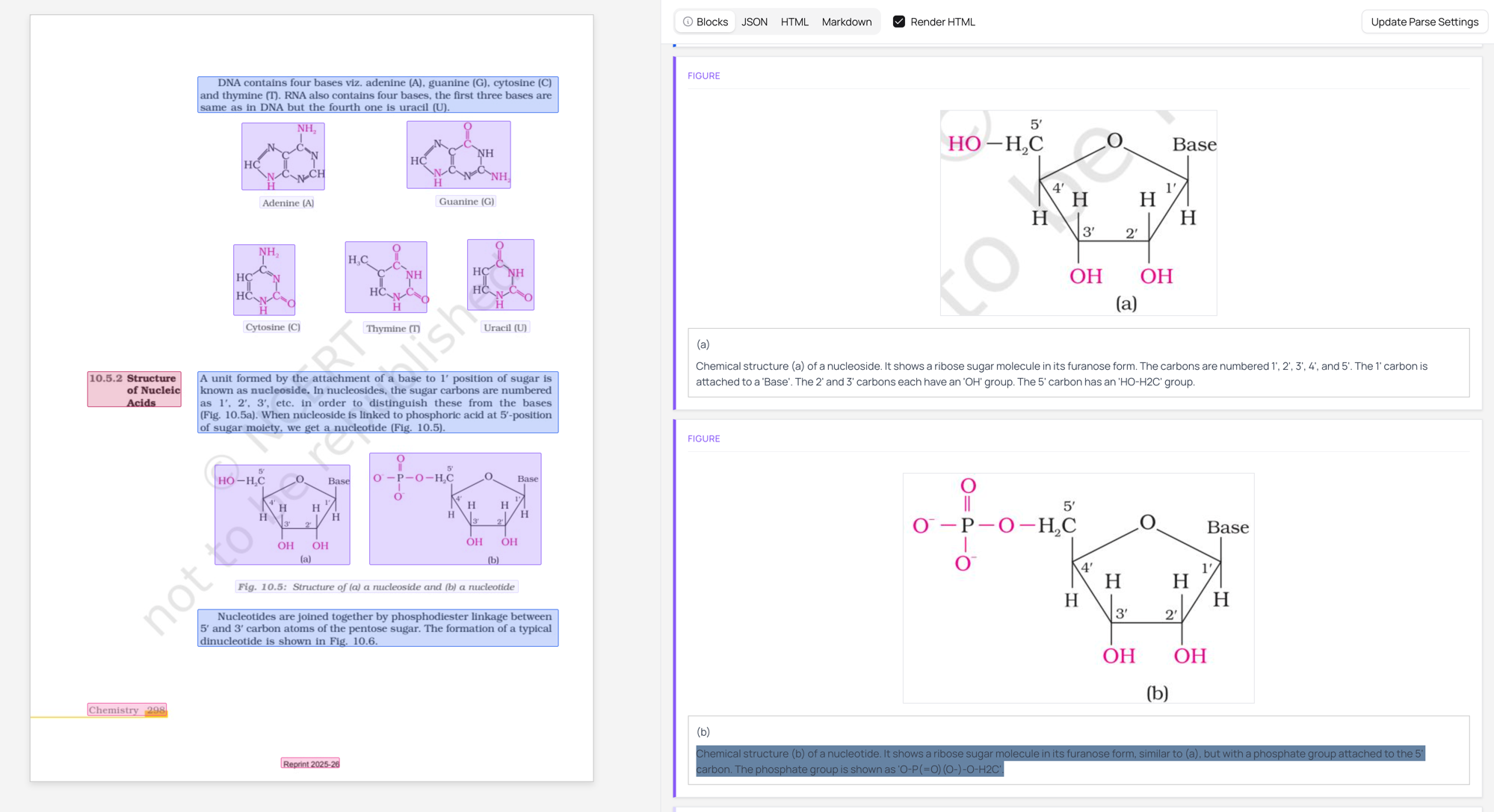
This is particularly useful for:
- Scientific paper processing
- Chemistry textbook digitization
- Patent analysis
- Research database indexing
In the Playground: Click “Update Parse Settings” and enable “New Block Types” under Additional Config to see chemical structure detection.
Via API:
curl -X POST "https://www.datalab.to/api/v1/marker"
  -H "X-Api-Key: YOUR_API_KEY"
  -F "file=@chemistry_paper.pdf"
  -F "extras=new_block_types"
List Marker Preservation
We now preserve exact list markers from the source document. Instead of normalizing all lists to simple bullets or numbers, we maintain the original format:
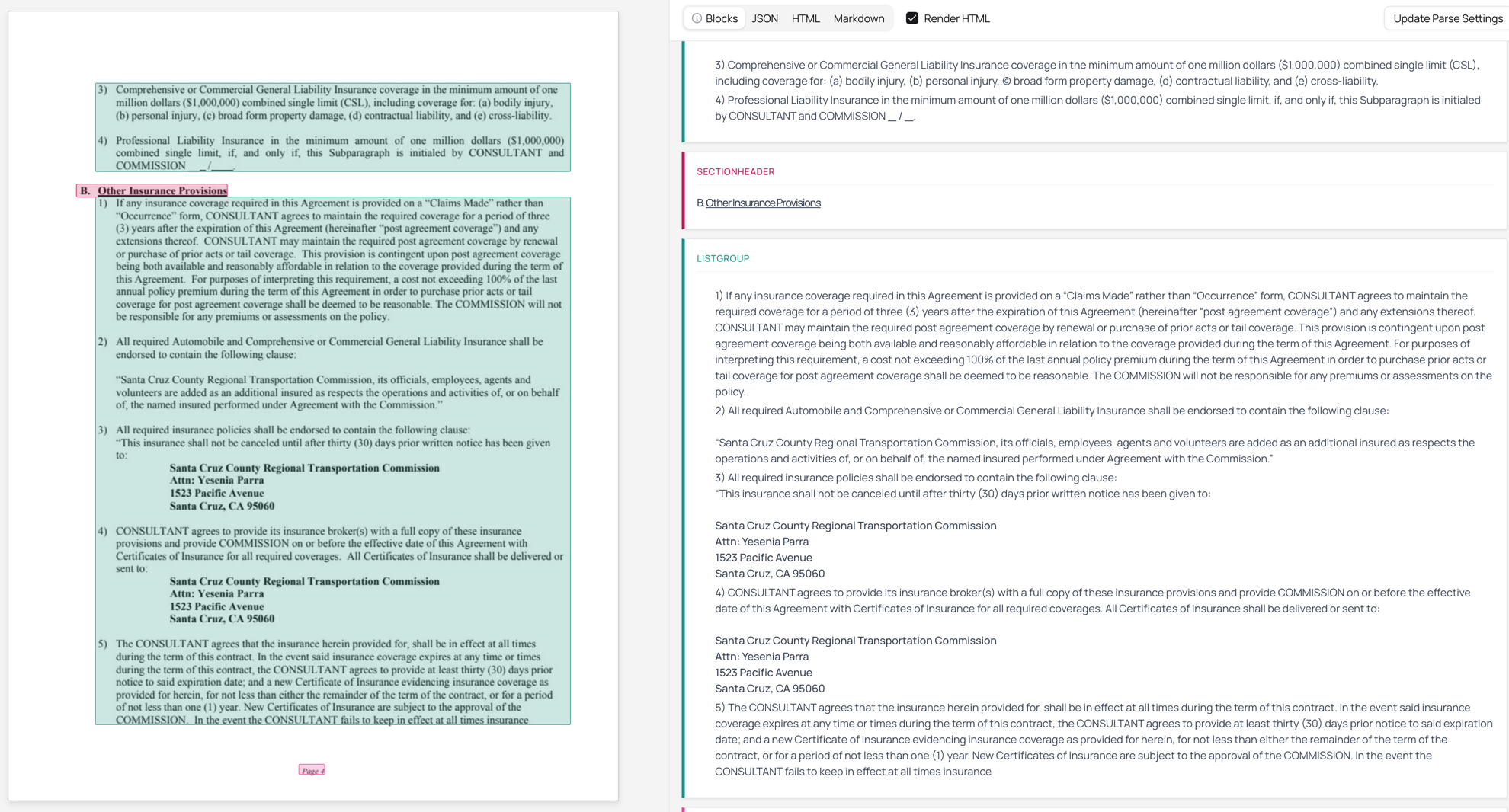
Notice how we preserve:
- Numbered sections (3, 4, 5…)
- Lettered subsections maintaining hierarchy
- Complex nested list structures common in legal documents
This is critical for legal documents, contracts, and technical specifications where list marker format carries semantic meaning.
Diagram Support
Chandra 1.5 can now convert flowcharts and diagrams into Mermaid format. The model understands the structure of the diagram and generates code that can be rendered programmatically.
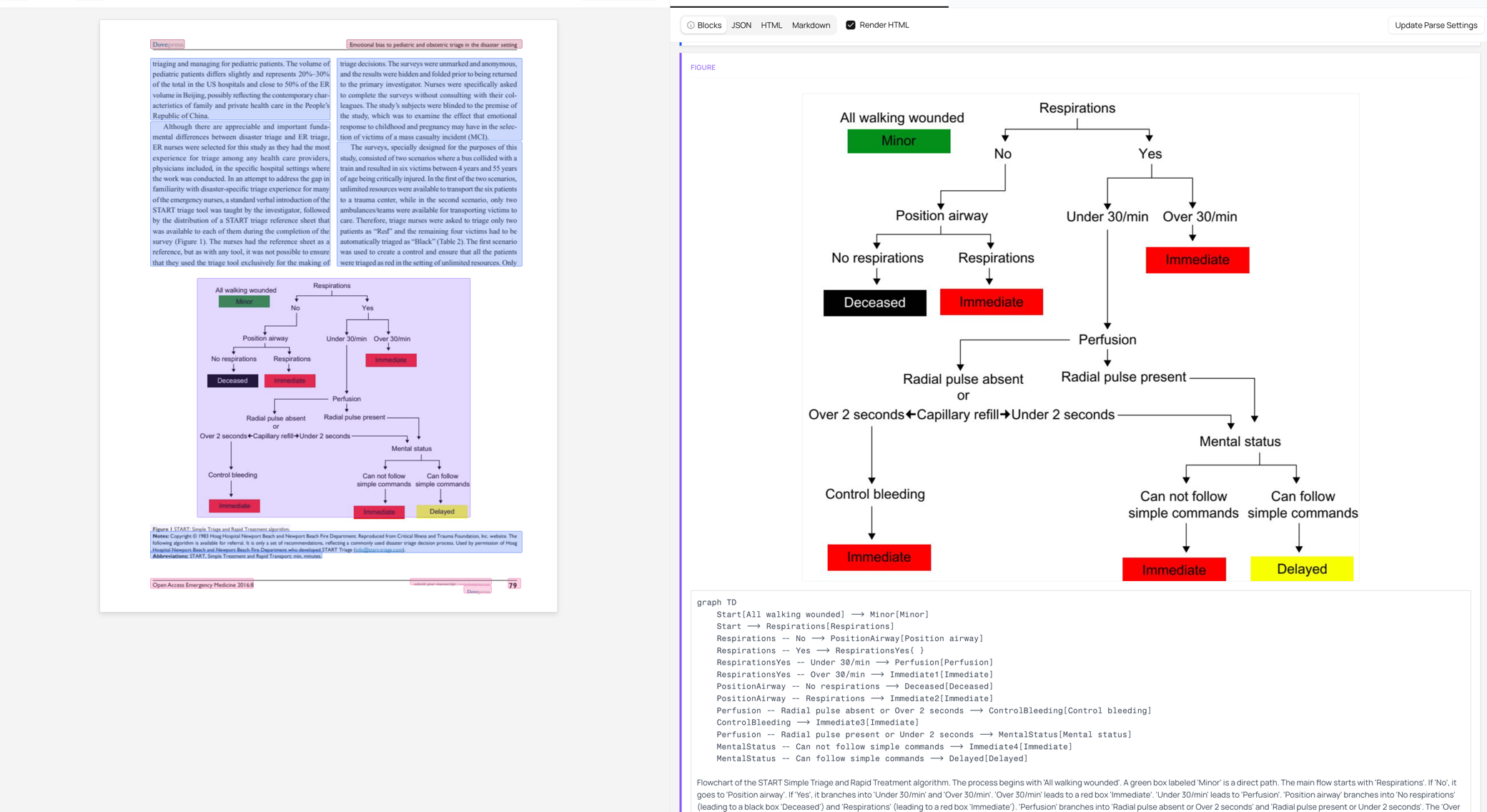
The output includes the original diagram, Mermaid source code, and a description, allowing you to:
- Edit and modify diagram content
- Include diagrams in documentation pipelines
Chart Understanding
We’ve improved our ability to extract data from charts and graphs. Chandra 1.5 can identify chart types, extract the underlying data, and generate detailed captions. Basic chart understanding happens by default, but enabling the chart_understanding extra uses an additional model to significantly improves the quality of extracted data and captions.
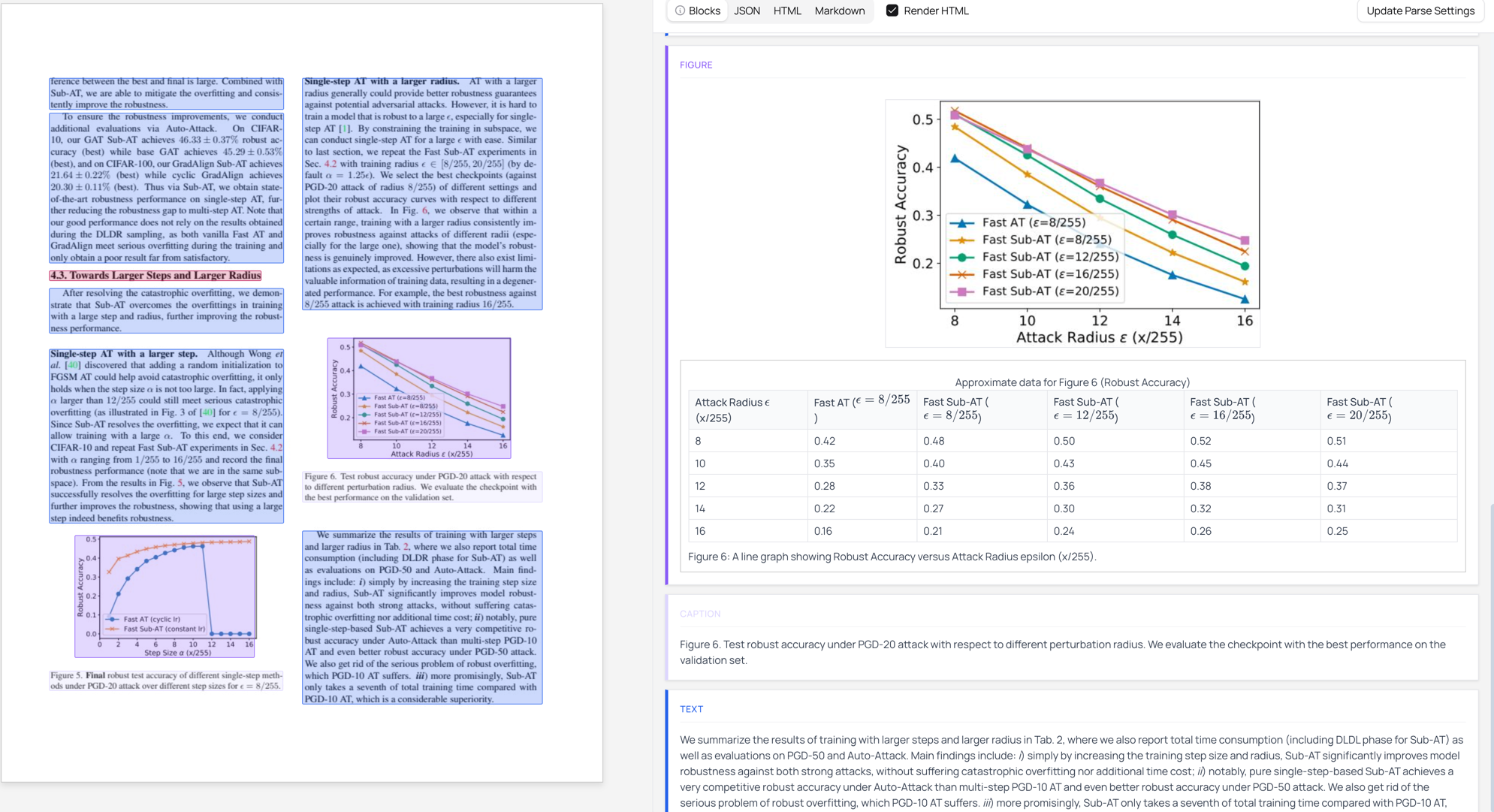
The model extracts:
- Chart titles and axis labels
- Data points and trends
- Detailed captions explaining the chart content
In the Playground: Click “Update Parse Settings” and enable “Chart Understanding” in the Extras section for improved chart extraction.
Via API: Enable the extra for higher quality chart extraction:
curl -X POST "https://www.datalab.to/api/v1/marker"
  -H "X-Api-Key: YOUR_API_KEY"
  -F "[email protected]"
  -F "extras=chart_understanding"
Formatting Improvements
Chandra 1.5 now properly detects and outputs:
- Bold text
- Italic text
- Underlined text
Strikethrough text
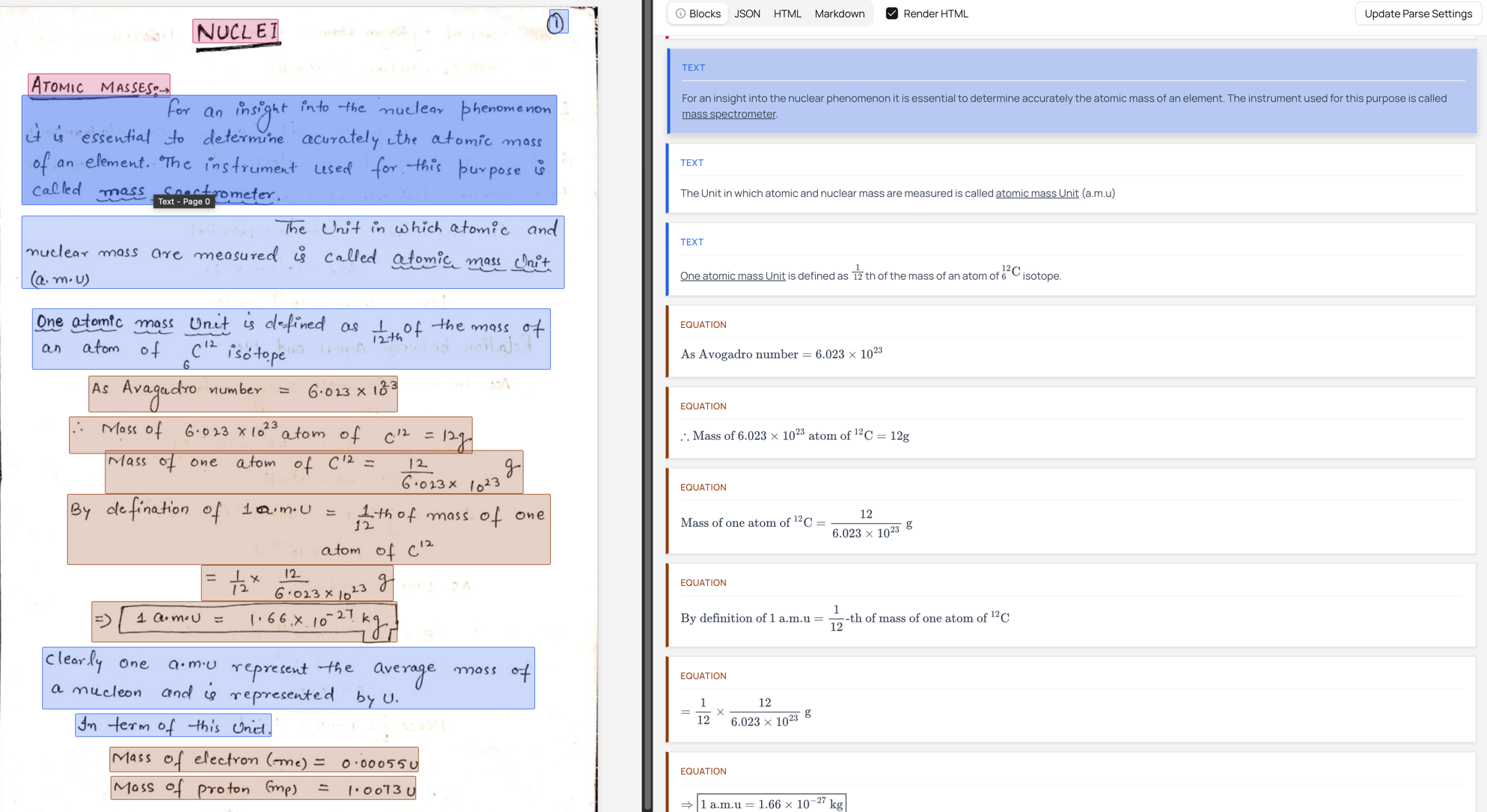
These formatting elements are preserved in the markdown and HTML output. The example above shows how underlined text in handwritten notes is correctly detected and rendered.
Redaction Handling
When we detect redacted text (blacked-out or obscured content), we now output a [REDACTED] placeholder instead of trying to guess the content.
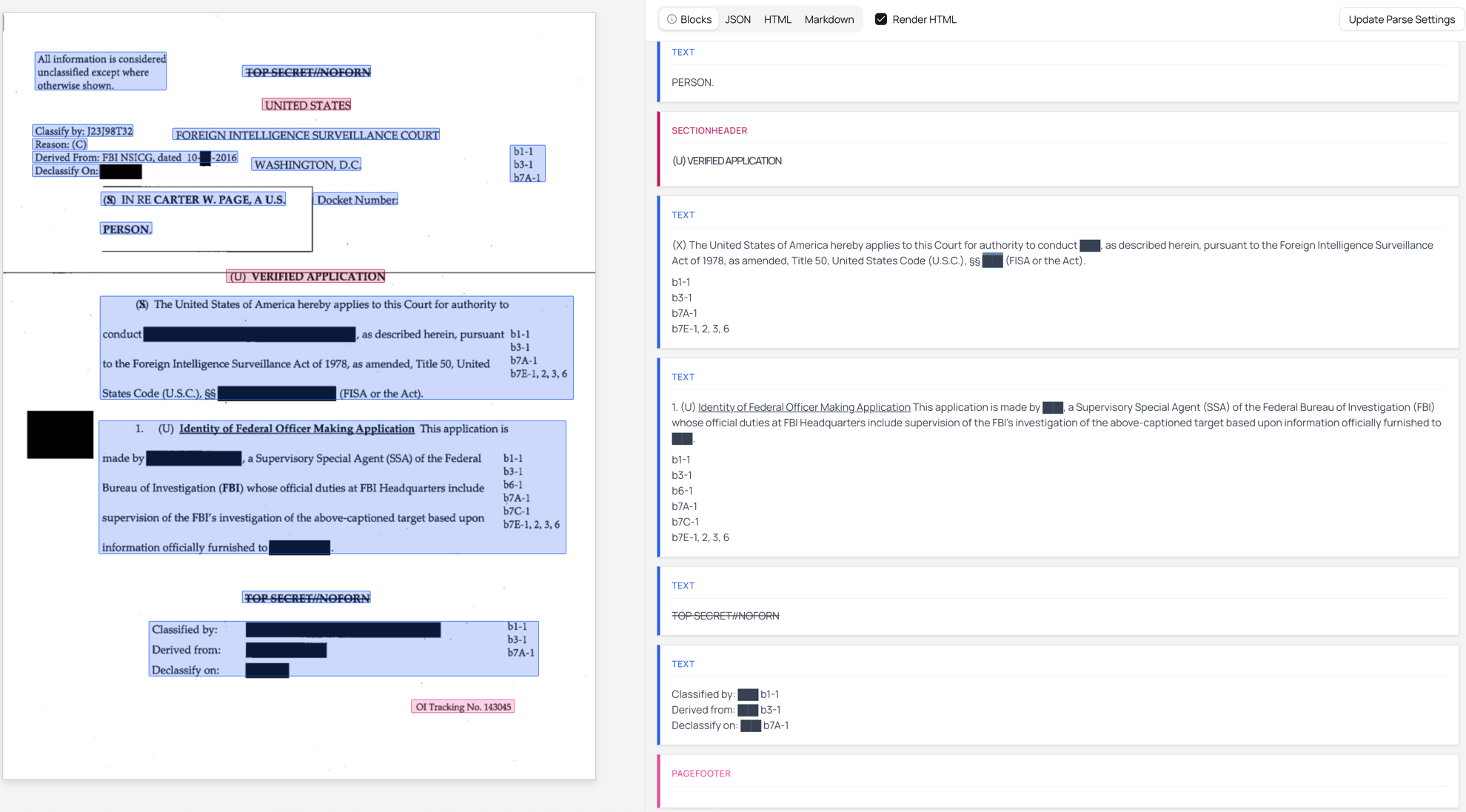
The model correctly identifies redacted sections and preserves their location in the output while marking them clearly:
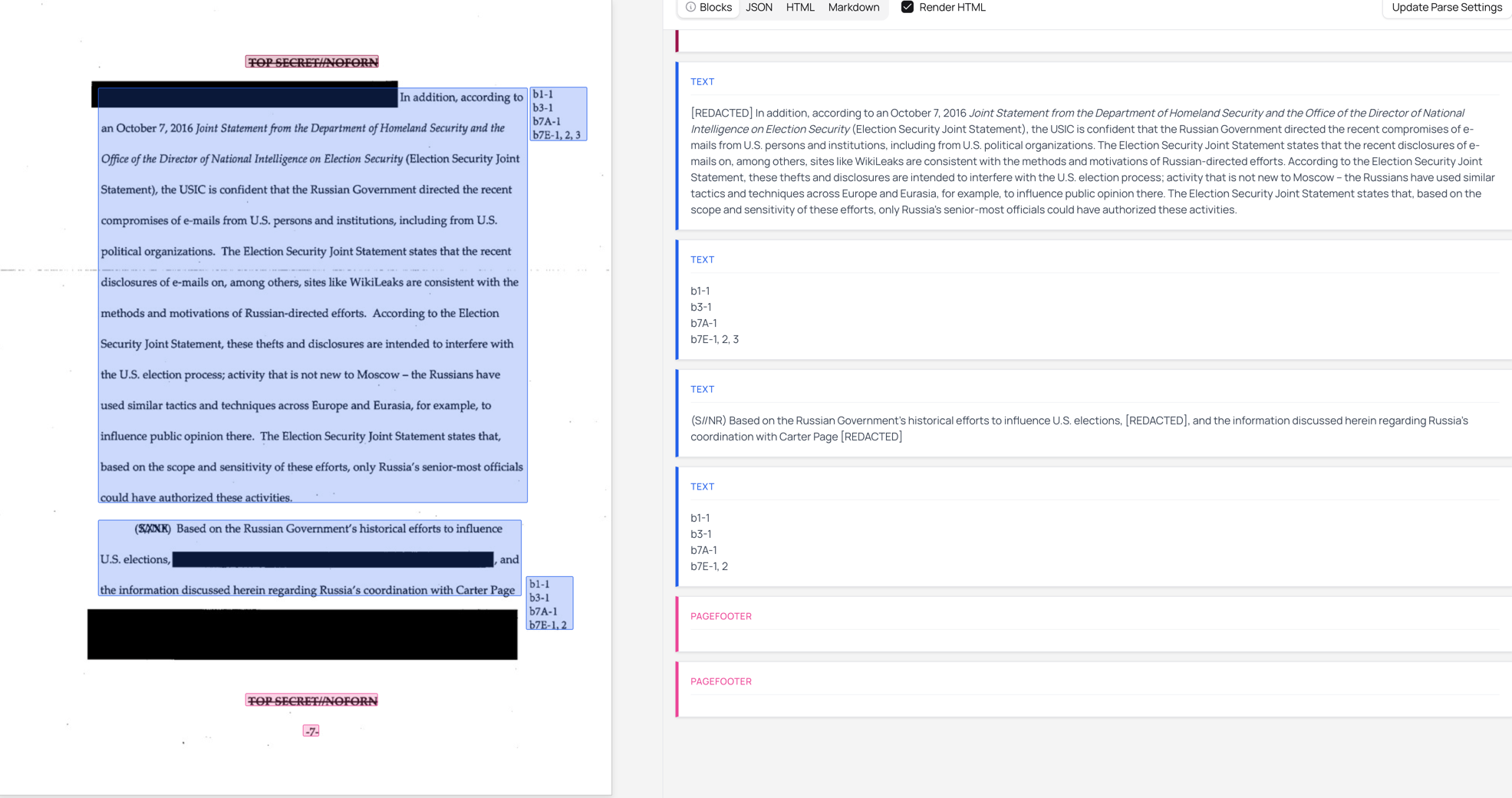
This is important for:
- Legal document processing
- Government document analysis
- Compliance workflows
Using These Features
In the Playground
- Upload your document at datalab.to/playground
- Click “Update Parse Settings” in the top right
- Configure your options:
- Extras section: Enable Chart Understanding or Infographic mode
- Additional Config section: Enable Table Row Bboxes, Extract Links, or New Block Types
- Click “Parse” to process your document
Via API
All features are available through the extras parameter as a comma-separated list:
curl -X POST "https://www.datalab.to/api/v1/marker"
  -H "X-Api-Key: YOUR_API_KEY"
  -F "[email protected]"
  -F "extras=chart_understanding,table_row_bboxes,new_block_types"
Available extras:
| Extra | Description |
|---|---|
chart_understanding | Improved data and caption extraction from charts |
table_row_bboxes | Include bounding boxes for table rows |
new_block_types | Enable detection of chemistry, handwriting, signatures |
extract_links | Extract hyperlinks from digital PDFs |
infographic | Optimized mode for infographic-style documents |
track_changes | Preserve track changes from Word documents |
On-Premises
For enterprise customers who need to run Chandra on their own infrastructure, we offer quantized versions optimized for various hardware configurations. Contact us at [email protected] for details.
What’s Next
We’re continuing to improve Chandra with a focus on:
- Even better table extraction for edge cases
- Expanded language support
- Further latency reductions
- Improved handling for formatting
We’ll write more about these in the coming weeks, as well as do some deep dives into the features above.
If you have feedback or specific use cases we can help with, reach out to us at [email protected] or find me on Twitter.