
We just released Chandra 2, a 4B parameter OCR model that scores 85.9% (state of the art) on the olmOCR benchmark, and is a significant improvement over Chandra 1 on our internal multilingual eval. Chandra 2 is smaller than Chandra 1, but improves on it in every category.
Here’s what changed:
- Model size: 4B params, down from 9B
- Multilingual: 77.8% avg on top 43 languages (was 69.4%), 72.7% avg on 90 languages
- olmOCR benchmark: 85.9% overall, up from 83.1%
- Accuracy: More accurate on tables, forms, math, complex layouts
- Throughput: 2 pages/sec on H100 with 96 concurrent requests
- Layout: 15+ block types with bounding boxes in the output
- Chart + image handling: Mermaid for diagrams, structured data from charts, image captioning
The model is on GitHub and HuggingFace. You can try it in the playground or via the API.
Benchmarks
olmOCR
olmOCR is a widely used OCR benchmark from AllenAI. It involves unit testing OCR output against known correct elements.
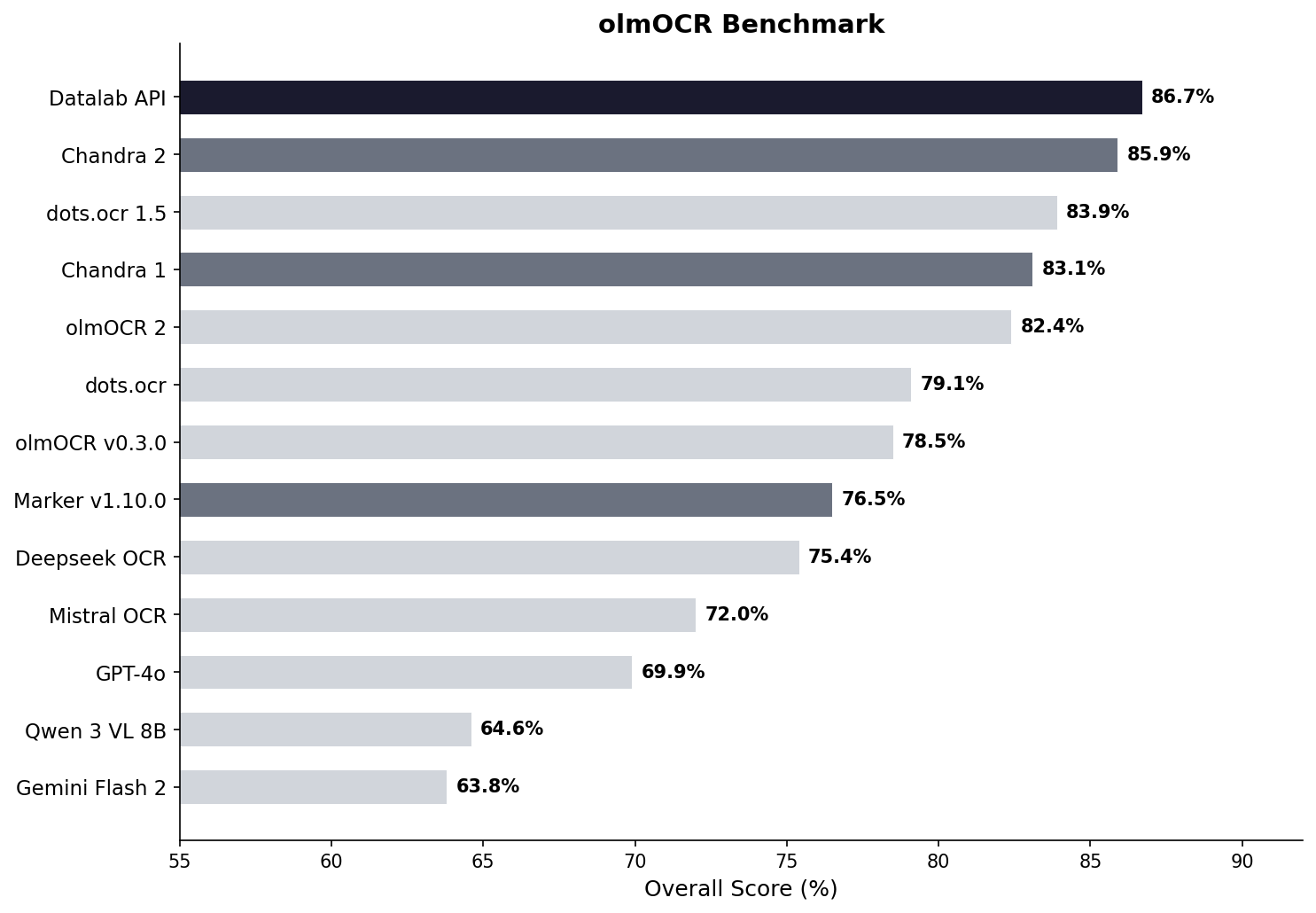
Using the olmOCR benchmark with some model-specific html tag removal.
Per-category breakdown vs Chandra 1:
| Category | Chandra 1 | Chandra 2 | Change |
|---|---|---|---|
| ArXiv | 82.2% | 90.2% | +8.0 |
| Old Scans Math | 80.3% | 89.3% | +9.0 |
| Tables | 88.0% | 89.9% | +1.9 |
| Multi column | 81.2% | 83.5% | +2.3 |
| Overall | 83.1% | 85.9% | +2.8 |
The olmocr benchmark is excellent, but is also saturated. We wrote more about the benchmark’s limitations in Saturating the olmOCR Benchmark. That’s why we also made an internal multilingual benchmark to help us evaluate the model across more edge cases.
Multilingual
This was the main focus for Chandra 2. There’s no good public multilingual OCR benchmark, so we built one that tests tables, math, ordering, layout, and text accuracy across languages. This is intentionally a hard benchmark, to leave room for improvement. We tested on the top 43 languages, and on a longer tail of 90 world languages.
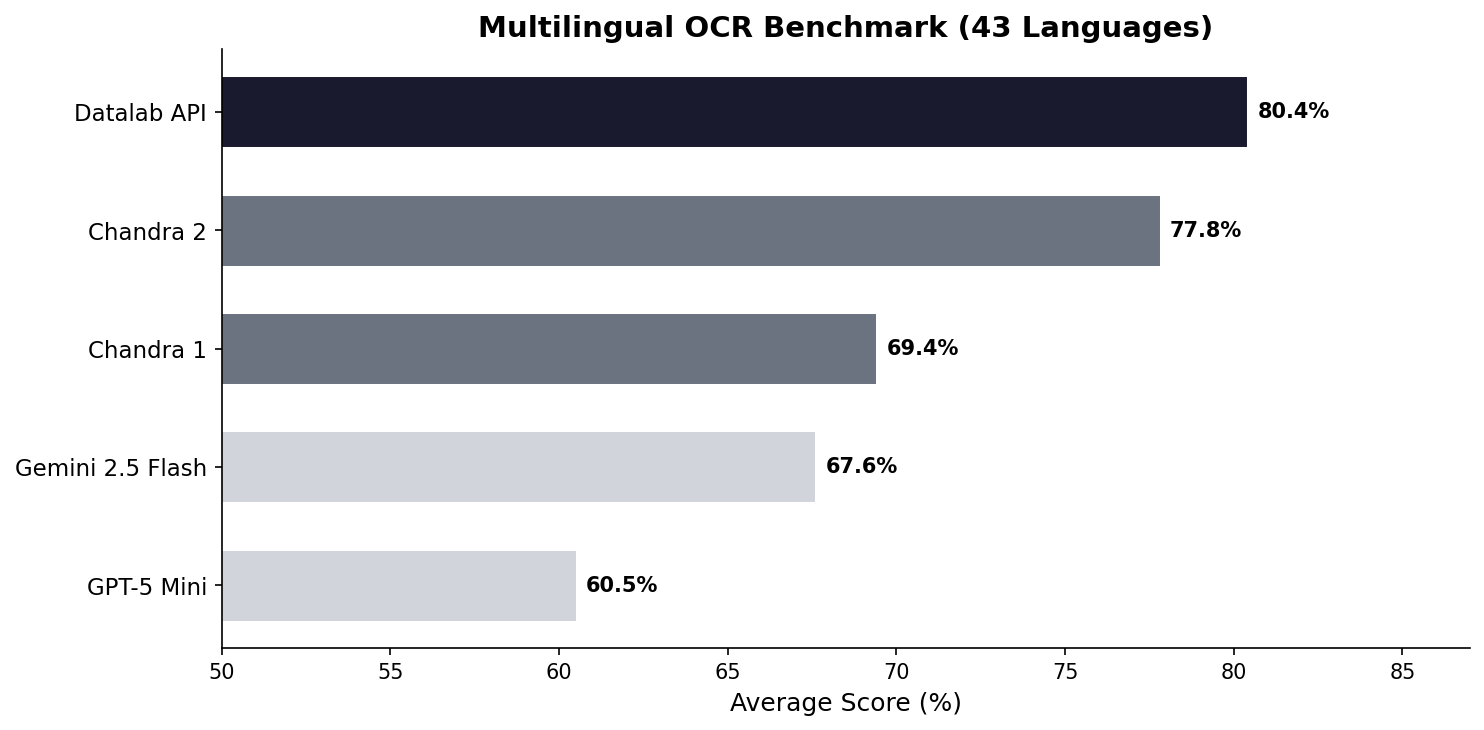
43-language averages: Chandra 2 77.8%, Chandra 1 69.4%, Gemini 2.5 Flash 67.6%, GPT-5 Mini 60.5%.
90-language averages: Chandra 2 72.7%, Gemini 2.5 Flash 60.8%.
Indic scripts saw the biggest improvements over Chandra 1:
| Language | Chandra 1 | Chandra 2 | Change |
|---|---|---|---|
| Hindi (hi) | 70.2% | 78.4% | +8.2 |
| Bengali (bn) | 45.6% | 72.8% | +27.2 |
| Kannada (kn) | 20.6% | 63.2% | +42.6 |
| Malayalam (ml) | 18.1% | 64.3% | +46.2 |
| Tamil (ta) | 50.8% | 77.7% | +26.9 |
| Telugu (te) | 19.5% | 58.6% | +39.1 |
| Marathi (mr) | 57.0% | 75.0% | +18.0 |
| Gujarati (gu) | 44.6% | 70.8% | +26.2 |
European languages also improved significantly:
| Language | Chandra 1 | Chandra 2 | Change |
|---|---|---|---|
| German (de) | 83.0% | 94.8% | +11.8 |
| Portuguese (pt) | 84.3% | 95.2% | +10.9 |
| French (fr) | 89.6% | 93.7% | +4.1 |
| Turkish (tr) | 68.1% | 84.1% | +16.0 |
| Polish (pl) | 83.9% | 91.5% | +7.6 |
| Swedish (sv) | 82.1% | 92.8% | +10.7 |
Right-to-left languages also improved substantially:
| Language | Chandra 1 | Chandra 2 | Change |
|---|---|---|---|
| Arabic (ar) | 34.0% | 68.4% | +34.4 |
| Hebrew (he) | 38.9% | 70.4% | +31.5 |
| Persian (fa) | 69.6% | 75.1% | +5.5 |
| Urdu (ur) | 28.1% | 43.2% | +15.1 |
Other major world languages like Chinese, Japanese, English, Korean, Spanish, and Russian were already strong in Chandra 1 and stayed strong in Chandra 2.
Full tables in the README and 90-language results.
Throughput
2 pages/second on an H100 with 96 concurrent requests.
Going from 9B to 4B parameters helps with throughput. The model also has an MTP head that can be used to further improve latency. We have a spectrum of versions that make different accuracy/latency tradeoffs for on-prem deployment, reach out at [email protected] if you need those.
Complex Layouts
Tables
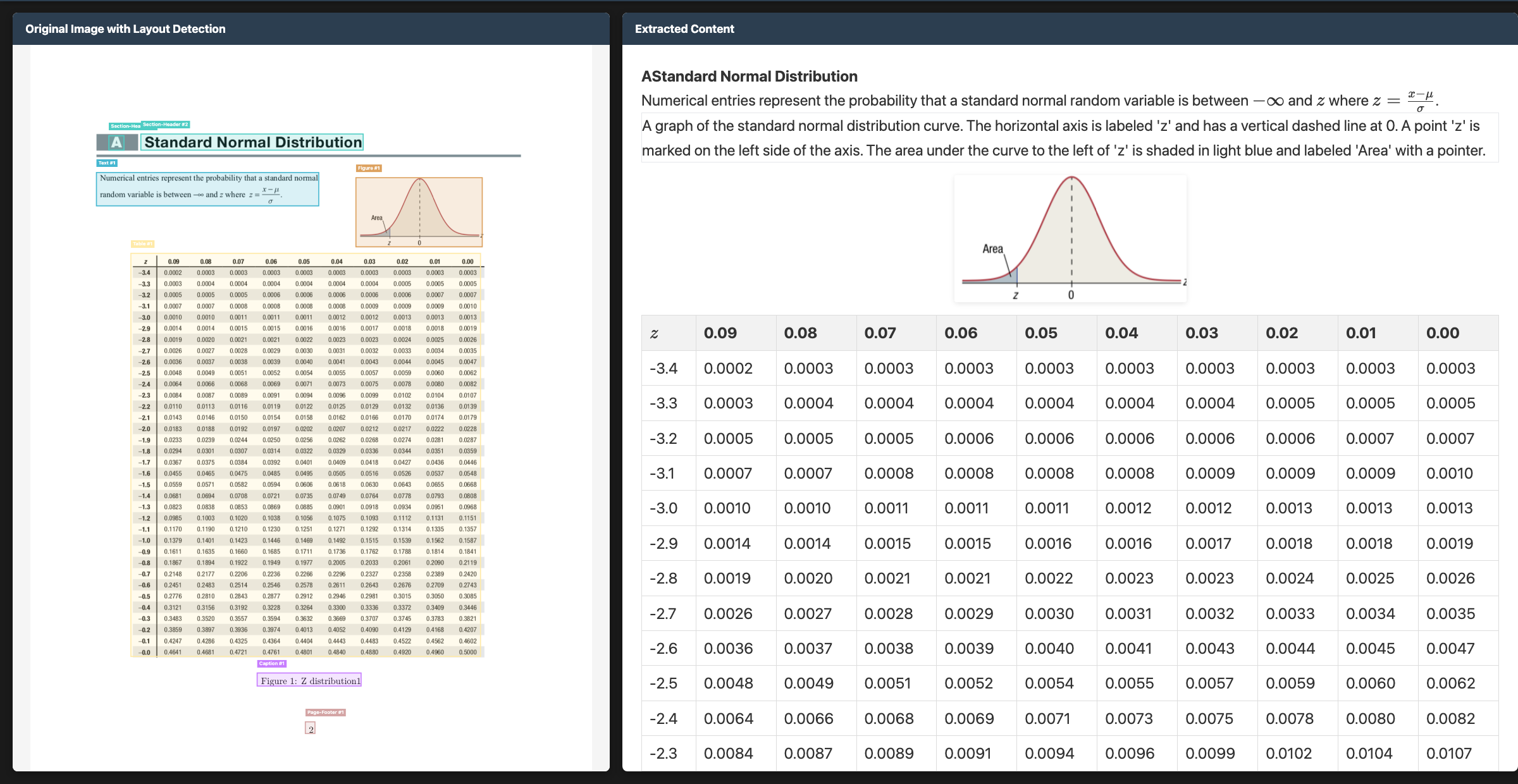
Chandra 2 handles colspan, rowspan, hierarchical headers, blank offset cells, and nested tables with embedded images. Table scores went from 88.0% to 89.9% on olmOCR, though the practical improvement on real-world documents with unusual structures is larger than that number suggests.
Math
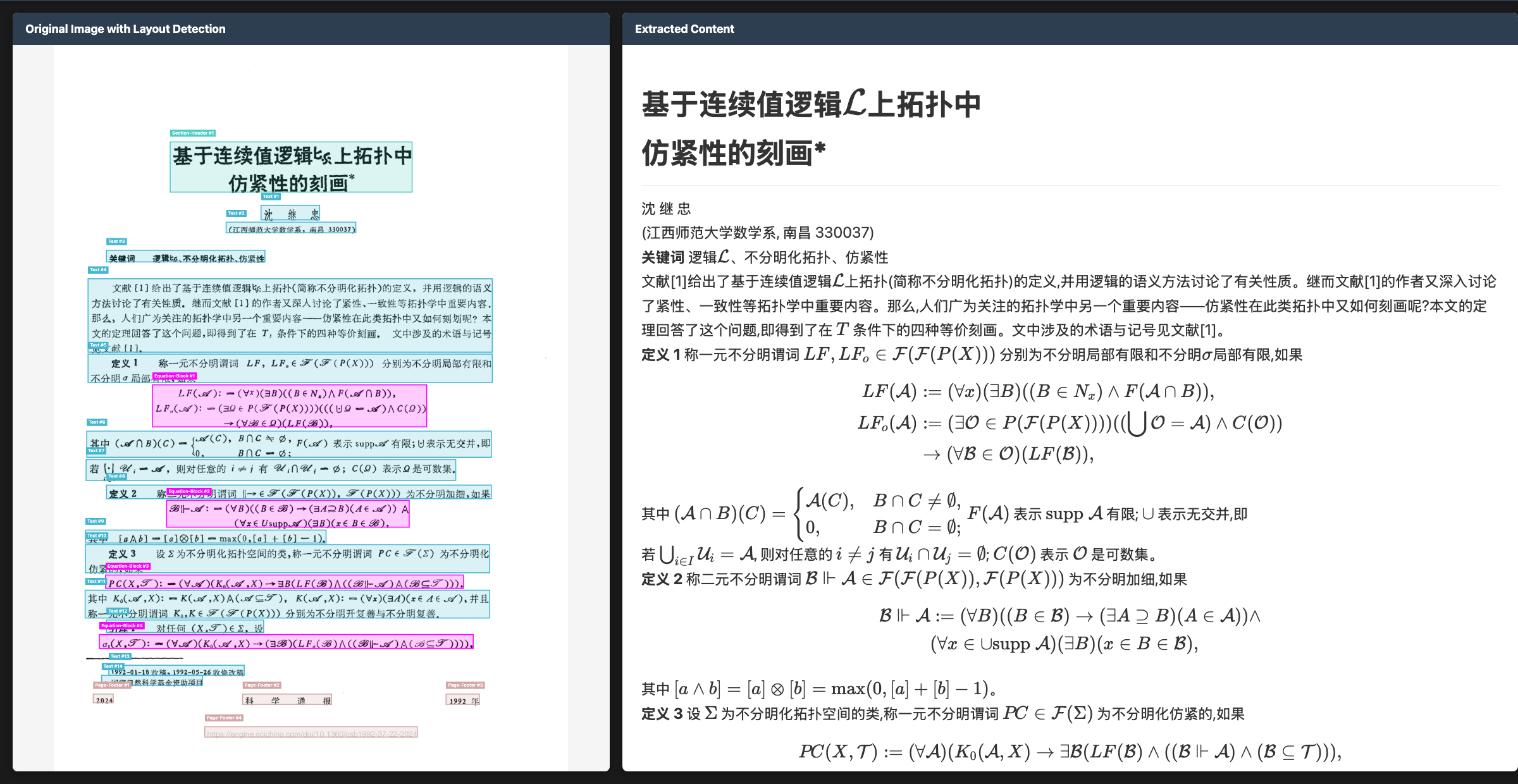
ArXiv scores jumped +8.0, old scans math +9.0. The Chinese math example above shows multilingual and math working together. The model handles printed math, handwritten equations, and math in non-Latin scripts.
Handwriting and Forms
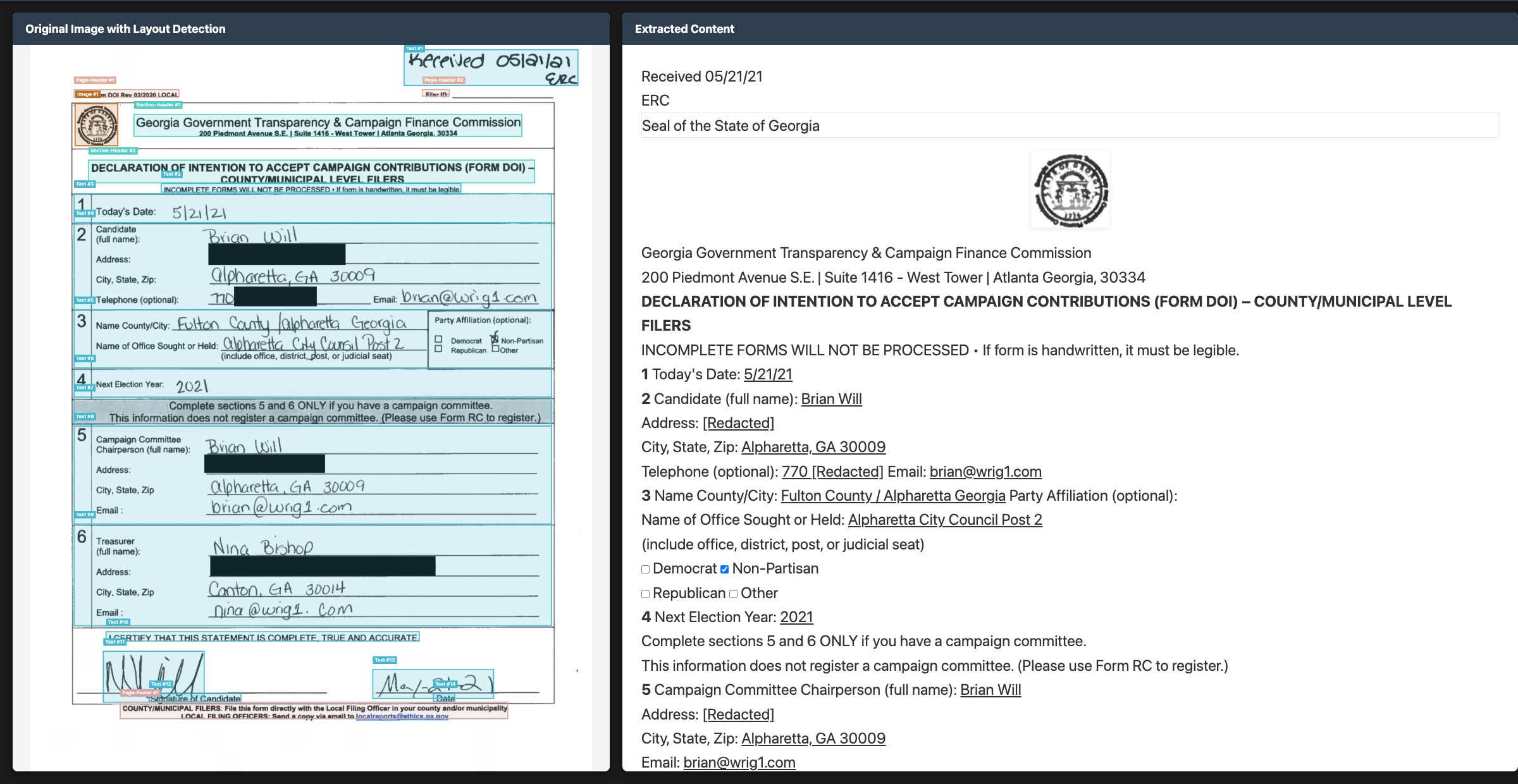
Form extraction preserves label-value relationships, detects checkboxes, and handles mixed printed-and-handwritten content.
Multilingual Examples
Arabic (RTL)
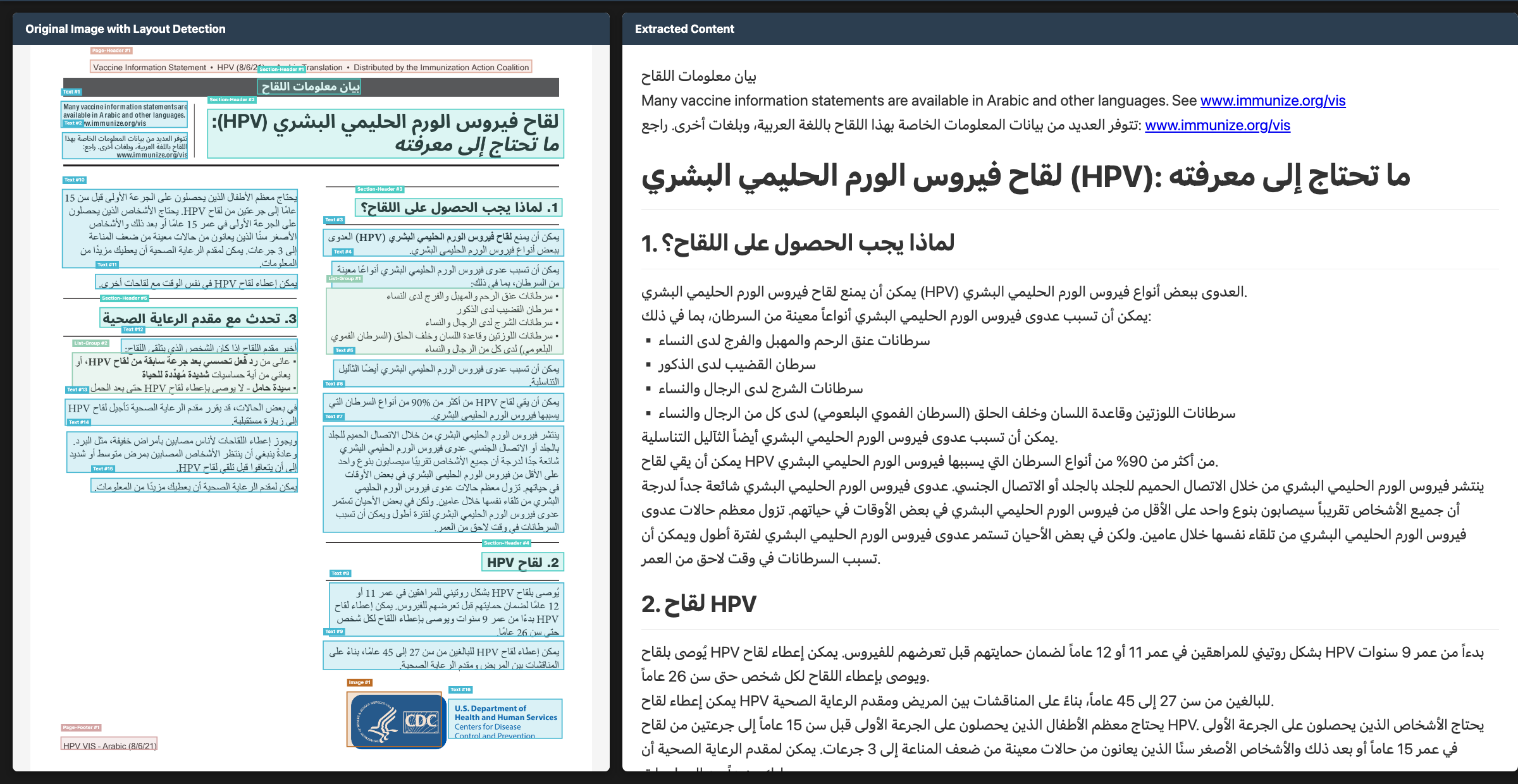
68.4%, up from 34.0%. Arabic’s connected script and diacritics make it hard for OCR, and we have room to improve here - expect news soon.
Japanese (CJK)
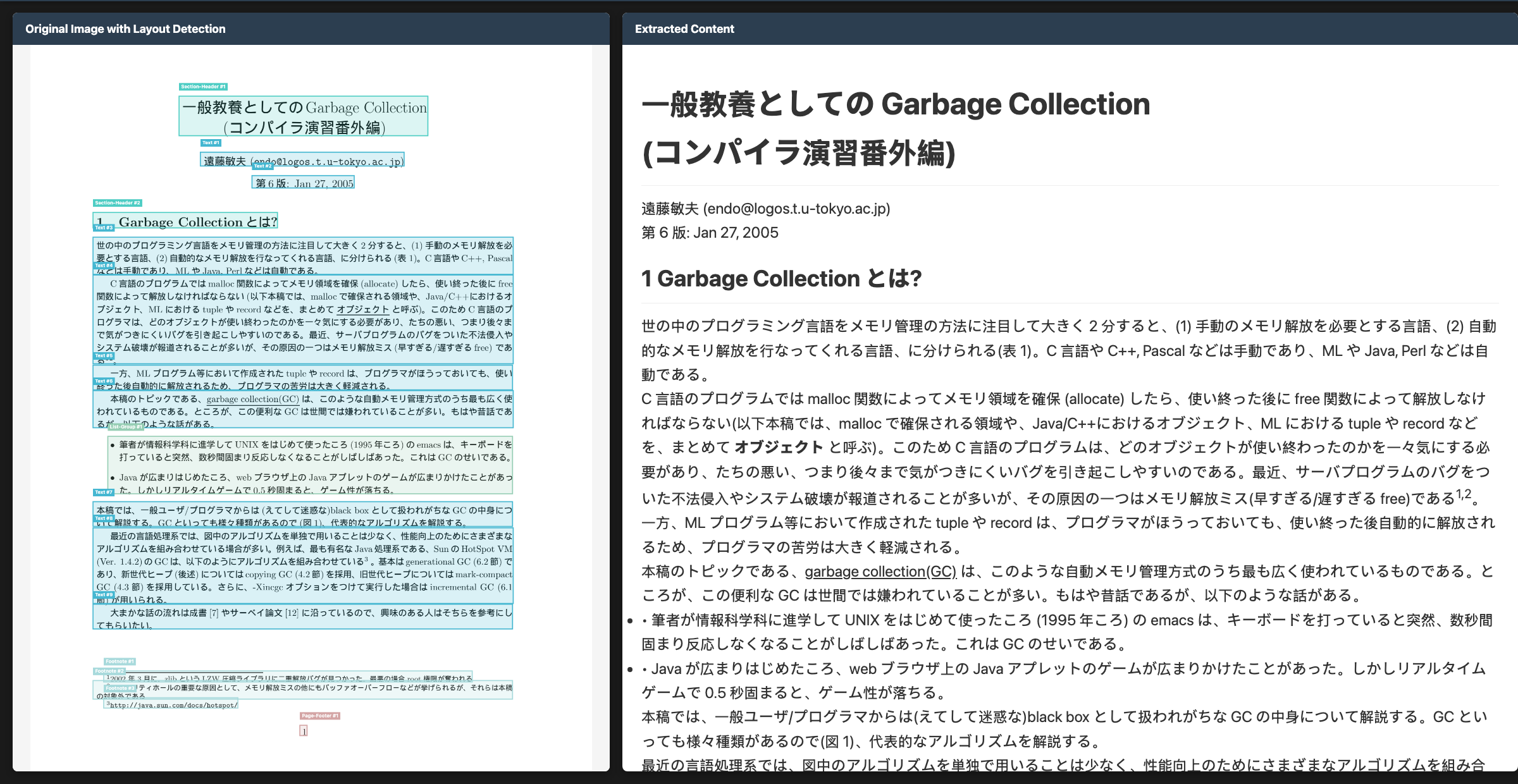
86.9%. Japanese mixes kanji, hiragana, and katakana within lines, sometimes with vertical text.
Hindi (Devanagari)
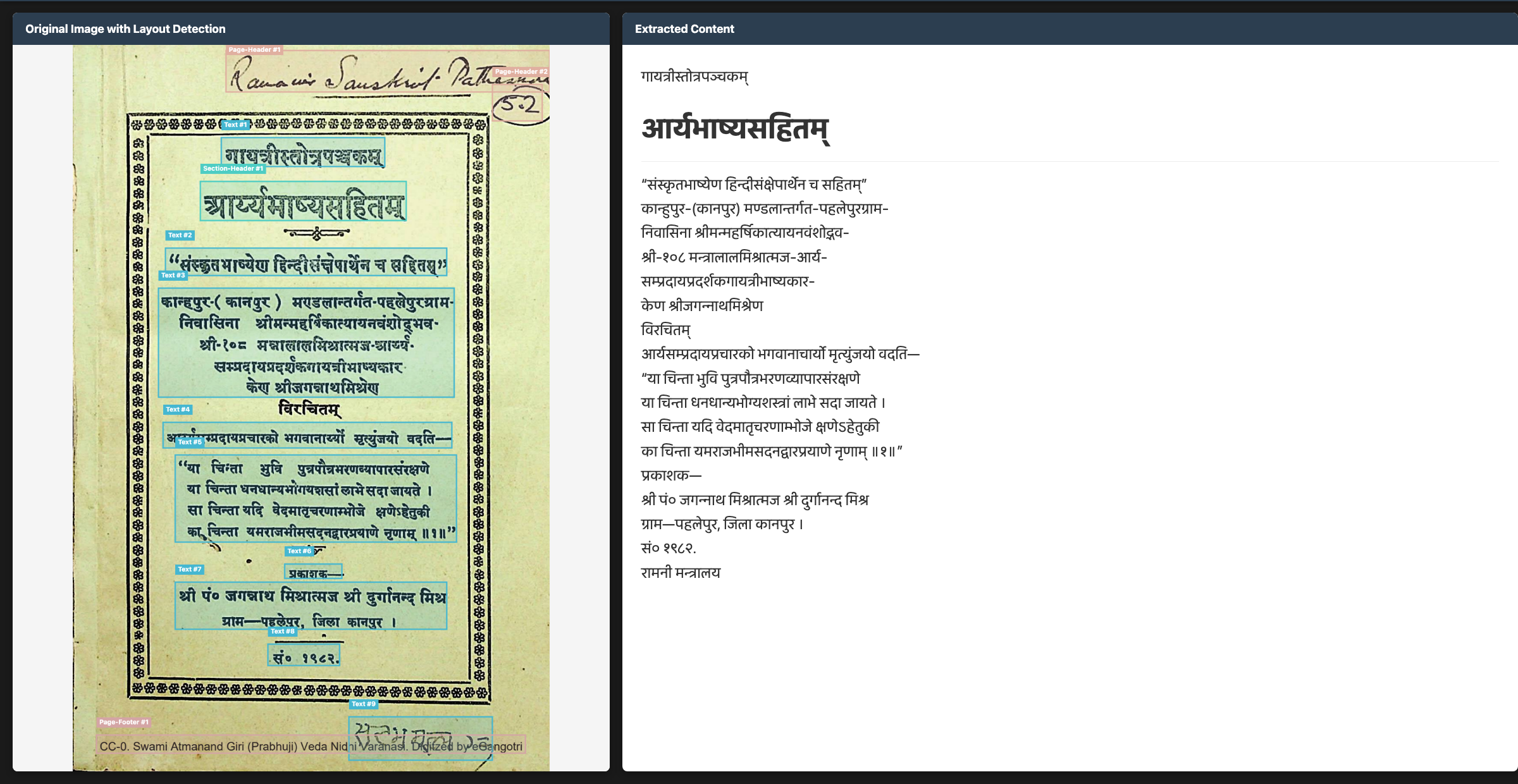
78.4%, up from 70.2%. We saw major improvements in other Indic languages as well.
Other Capabilities
Layout Blocks
Every element on the page gets a block type label and bounding box coordinates. Here’s what that looks like overlaid on a document:
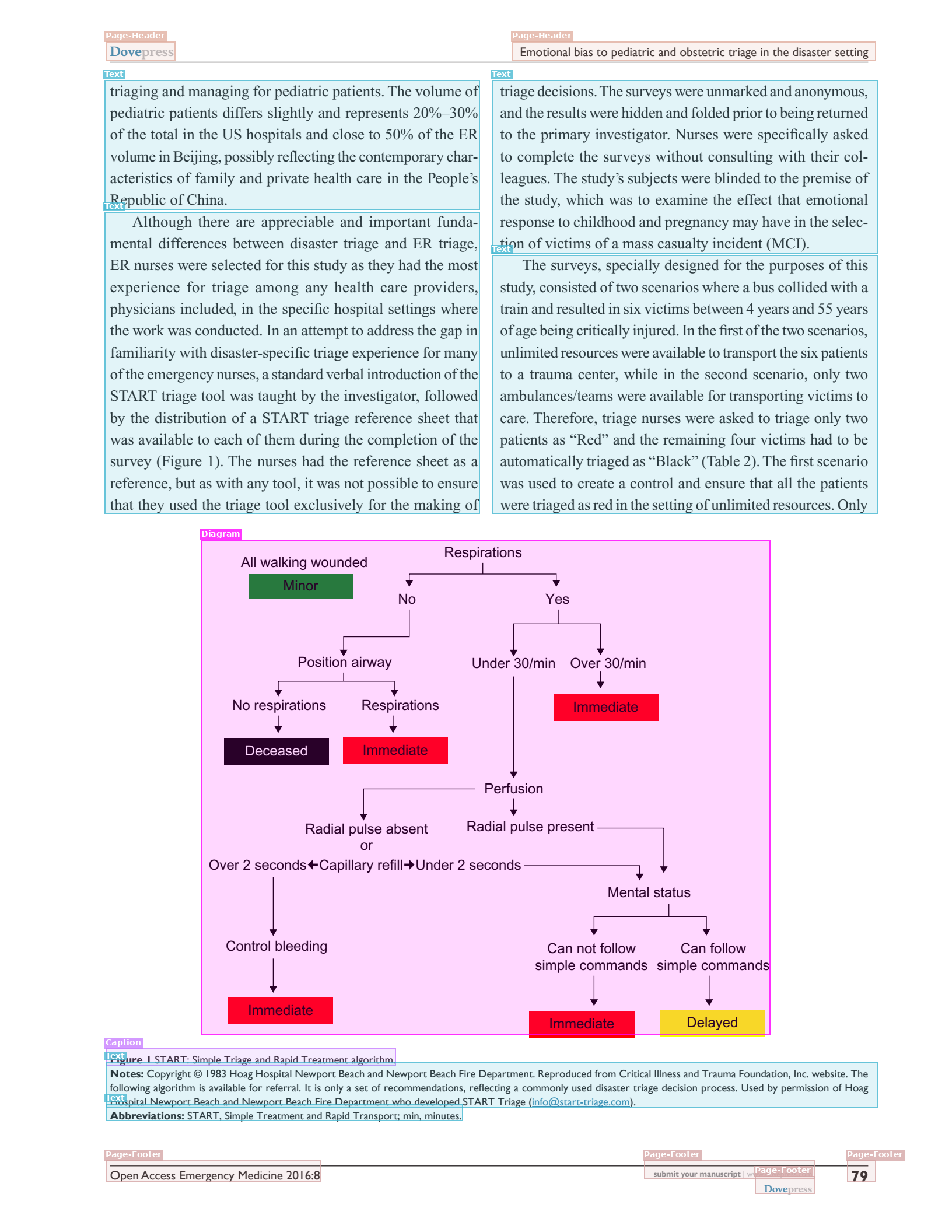
Chandra 1 could do layout blocks, but we’ve added some more block types. Here is the full list of block types in Chandra 2: text, section-header, caption, footnote, table, form, list-group, image, figure, diagram, equation-block, code-block, chemical-block, bibliography, table-of-contents, page-header, page-footer, complex-block.
These blocks help you customize the output to fit your needs.
Mermaid Diagrams
Flowcharts and process diagrams get converted to Mermaid format. Here’s the START triage flowchart from the page above:
graph TD
    A[All walking wounded] --> B[Minor]
    A --> C[Respirations]
    C -- No --> D[Position airway]
    C -- Yes --> E[Under 30/min]
    C -- Yes --> F[Over 30/min]
    D --> G[No respirations]
    D --> H[Respirations]
    G --> I[Deceased]
    H --> J[Immediate]
    F --> J
    E --> K[Perfusion]
    K --> L[Radial pulse absent or Over 2 seconds]
    K --> M[Radial pulse present or Under 2 seconds]
    L --> N[Control bleeding]
    N --> O[Immediate]
    M --> P[Mental status]
    P --> Q[Can not follow simple commands]
    P --> R[Can follow simple commands]
    Q --> S[Immediate]
    R --> T[Delayed]
The model extracts nodes, edges, labels, and flow direction. The output also includes a text description. Mermaid renders in GitHub, Notion, and most documentation tools.
Structured Data from Charts
Charts produce structured output (data points, axis labels, chart type, and trends), not just a caption.
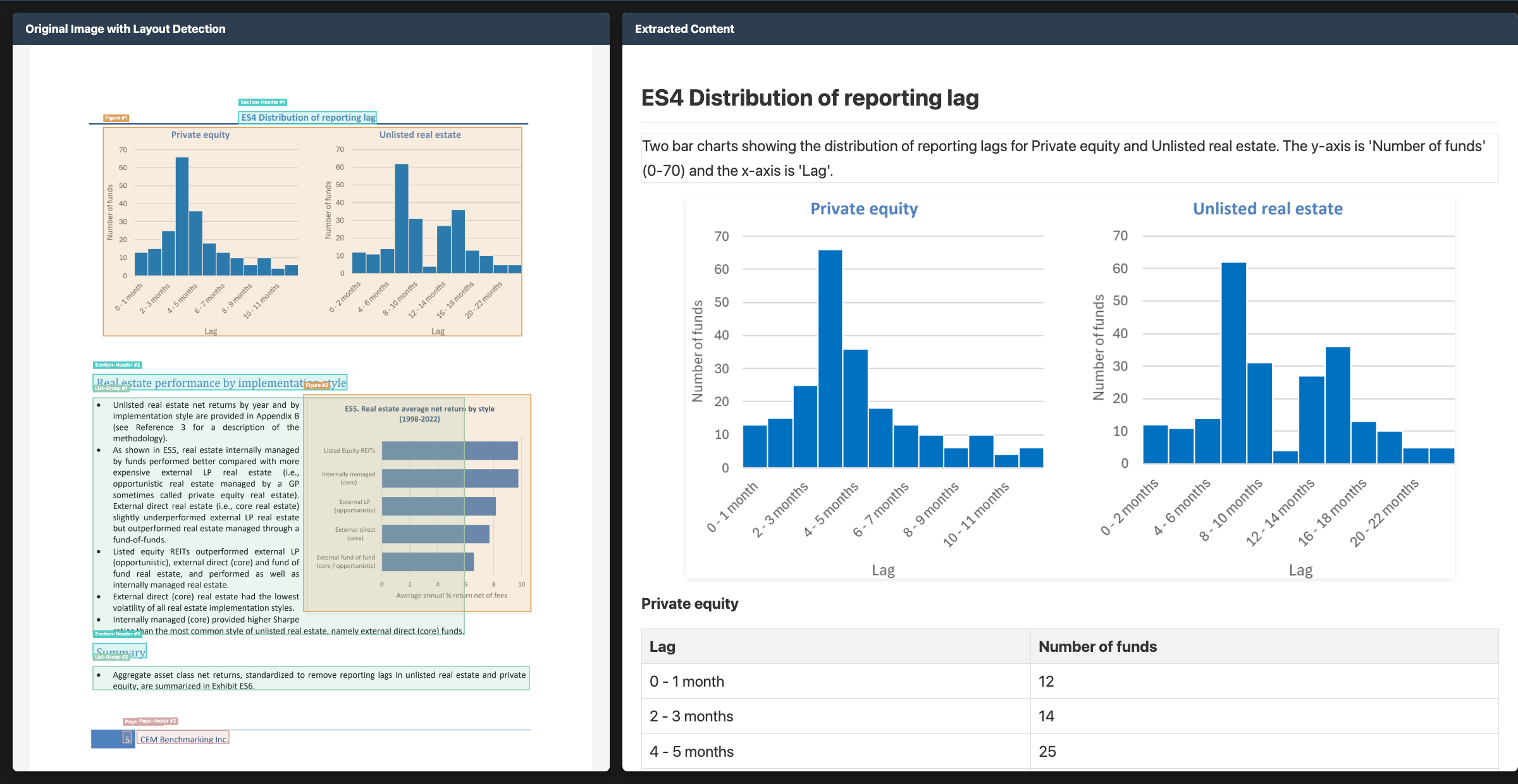
For a bar chart you get the actual values and categories. For a line chart, data series and time points.
Image Captioning
Because we have layout blocks, we can locate image boundaries and crop the images. Each extracted image gets a caption based on the visual content and surrounding context.
Chemistry and Other Block Types
Chemical structure detection generates molecular descriptions:
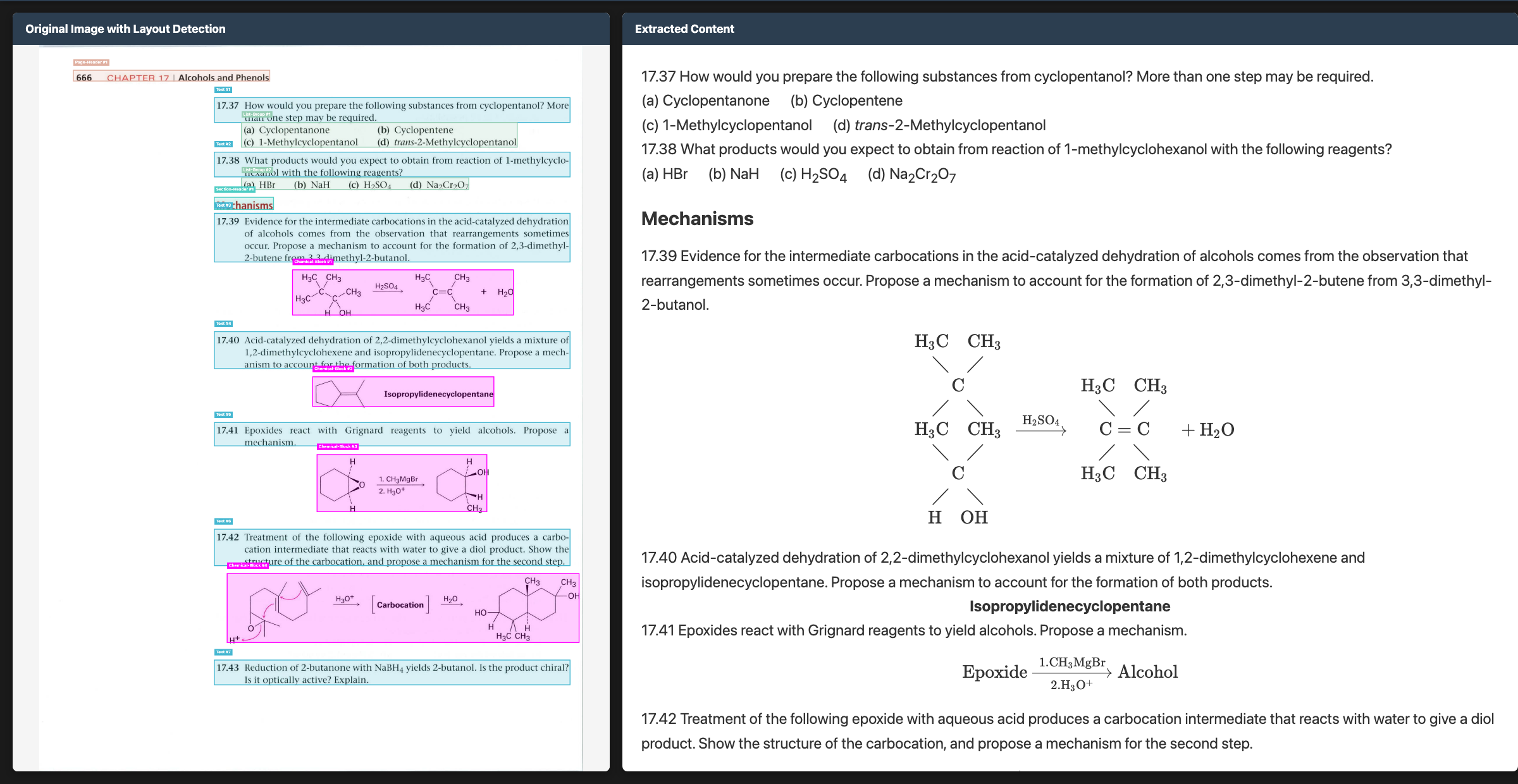
We also detect bibliography entries, code blocks, tables of contents, and equations (rendered as LaTeX).
Datalab API
The hosted API runs an improved version of Chandra 2 with additional extras. It scores higher than the open model across both benchmarks:
| Benchmark | Chandra 2 (open) | Datalab API |
|---|---|---|
| olmOCR overall | 85.9% | 86.7% |
| Multilingual (43 lang) | 77.8% | 80.4% |
Some per-category comparisons on olmOCR:
| Category | Chandra 2 (open) | Datalab API |
|---|---|---|
| ArXiv | 90.2% | 90.4% |
| Old Scans Math | 89.3% | 90.2% |
| Tables | 89.9% | 90.7% |
| Old Scans | 49.8% | 54.6% |
| Long tiny text | 92.1% | 92.3% |
The API can handle high throughput (we ran 300M pages last week), and has accuracy and quality of life improvements, such as automatic correction. It also allows you to build end to end workflows that include extraction, classification, etc. If you want the best accuracy and don’t want to deal with infrastructure, use the API. If you want to run on your own hardware or need to keep data on-prem, use the open model.
Using Chandra 2
Open Source
pip install chandra-ocr

# With vLLM (recommended)
chandra_vllm
chandra input.pdf ./output

# With HuggingFace
pip install chandra-ocr[hf]
chandra input.pdf ./output --method hf
Playground
- Go to datalab.to/playground
- Upload a document
- Click “Update Parse Settings” to configure extras
- Click “Parse”
API
curl -X POST "https://www.datalab.to/api/v1/marker"
  -H "X-Api-Key: YOUR_API_KEY"
  -F "[email protected]"
  -F "extras=chart_understanding,new_block_types"
import requests
url = "https://www.datalab.to/api/v1/marker"
headers = {"X-Api-Key": "YOUR_API_KEY"}
files = {"file": open("document.pdf", "rb")}
data = {"extras": "chart_understanding,new_block_types"}
response = requests.post(url, headers=headers, files=files, data=data)
result = response.json()Available extras:
| Extra | Description |
|---|---|
chart_understanding | Better data and caption extraction from charts |
table_row_bboxes | Bounding boxes for individual table rows |
new_block_types | Chemistry, handwriting, signature detection |
extract_links | Extract hyperlinks from digital PDFs |
infographic | Optimized for infographic-style documents |
track_changes | Preserve track changes from Word documents |
On-Premises
We have quantized versions for on-prem deployment. Contact [email protected].
What’s Next
We’re working on broader language coverage (especially low-resource languages), latency reductions, smaller model variants, better table/form edge cases, and long document handling.
We’ll write more about the multilingual training process and benchmarking methodology in the coming weeks.
If you have any suggestions or feedback, please email [email protected], or find me on Twitter.