
We’re excited to announce a new feature for document review workflows: Track Changes Extraction for Word documents.
If you’ve ever reviewed contract redlines, you know the drill. Someone sends you a Word doc with Track Changes enabled. You open it up to find a sea of strikethroughs, insertions, and margin comments from multiple reviewers.
Now you need to:
- Identify what actually changed
- Figure out who made which changes
- Extract action items from comments
- Summarize the revisions for your client or team
- Assess whether the changes shift risk or obligations
You can now use the Datalab API to extract all this metadata from Word documents and automate these downstream processes.
Extracting Tracked Changes with Datalab
Our new track_changes feature extracts all tracked changes and comments from Word documents, preserving:
- Insertions and deletions with author names and timestamps
- All comments with author details and associated text
Here’s what the output looks like in our playground (you can also use our public, unauthenticated playground, with limits, for free) for a mutual NDA that’s been through review between titans of industry Acme Corp and Wonka Industries.
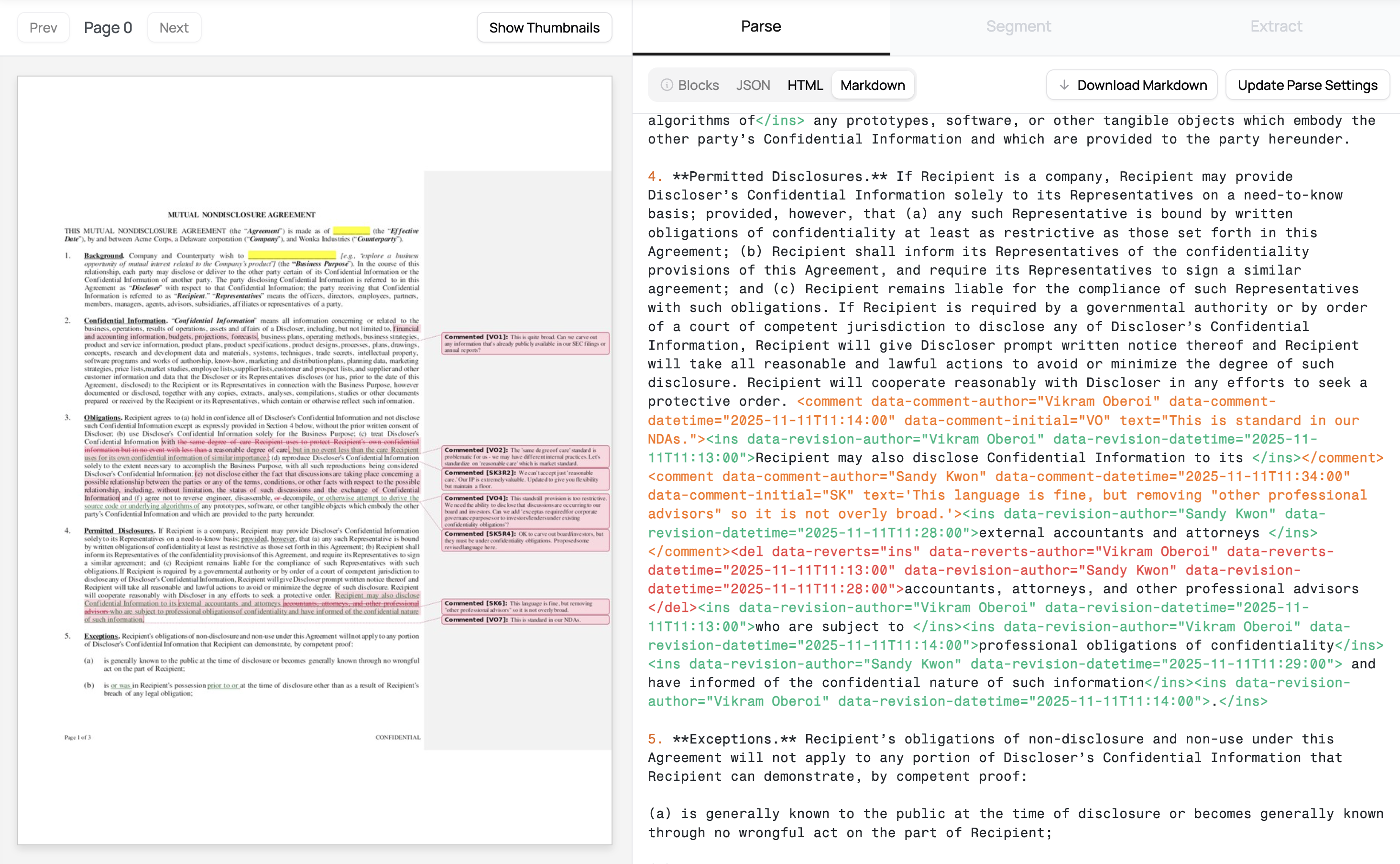
The Markdown and HTML output here includes deletions and insertions like so:
<del data-revision-author="Vikram Oberoi" data-revision-datetime="2025-11-11T10:34:00">
  the same degree of care Recipient uses to protect Recipient's own confidential information but in no event with less than
</del>
a reasonable degree of care
<ins data-revision-author="Sandy Kwon" data-revision-datetime="2025-11-11T11:24:00">
  , but in no event less than the care Recipient uses for its own confidential information of similar importance.
</ins>
Comments are extracted thusly:
<comment
  data-comment-author="Vikram Oberoi"
  data-comment-datetime="2025-11-11T11:12:00"
  data-comment-initial="VO"
  text="This standstill provision is too restrictive. We need the ability
               to disclose that discussions are occurring to our board and investors."
>
  (e) not disclose either the fact that discussions are taking place...
</comment>
Every change and comment includes full metadata - who made it, when they made it, and what they changed.
This makes it trivial to generate summaries, track negotiation patterns, or identify unresolved issues.
This output works well out-of-the-box for some of our most complex agreements internally. Give it a try on your legal agreements and holler if you run into issues or have feature requests.
Our aim is to give customers more power and flexibility in how they need to parse and render such output in the future.
Using the API
To extract tracked changes via our /marker endpoint, just set extras to "track_changes" and submit a docx file.
import requests

form_data = {
    'file': ('contract.docx', open('contract.docx', 'rb'),
             'application/vnd.openxmlformats-officedocument.wordprocessingml.document'),
    'extras': (None, 'track_changes'),
    'output_format': (None, 'html,markdown')
}

headers = {"X-Api-Key": "YOUR_API_KEY"}
response = requests.post("https://www.datalab.to/api/v1/marker",
                        files=form_data, headers=headers)
Once you have the marked-up content, you can pipe it to an LLM for analysis:
# Generate a redline summary
review_prompt = """Analyze this contract with tracked changes and provide:
1. A concise summary of all changes made
2. Key changes that materially affect the agreement
3. Any changes that shift risk or obligations between parties
4. Recommended action items for legal review

Document: {content}"""

# Send to LLM
analysis = analyze_with_llm(marked_up_doc, review_prompt)
We’ve written a complete guide with code samples here: Track Changes in Word Docs.
Pricing
Track Changes extraction is available now on all Marker API plans at the same rate a High Accuracy Mode, billed $6/1000 pages.
Try it out in Playground or check out the full API documentation.
As always, reach out to us at [email protected] if you have questions or want to discuss custom enterprise plans.