
/api/v1/fill takes a blank form and your values and gives you back the form with the values entered in it. As of today it runs on our document agent instead of the older pipeline.
The API has not changed. Same endpoint, same request, same output_base64 / fields_filled / fields_not_found in the response. What changed is how the work gets done, and — more to the point — whether anything checks that it was done.
Here it is on CERFA 12485, a French health form whose fields are ruled in pale blue and whose insurance number is fifteen separate one-character boxes:
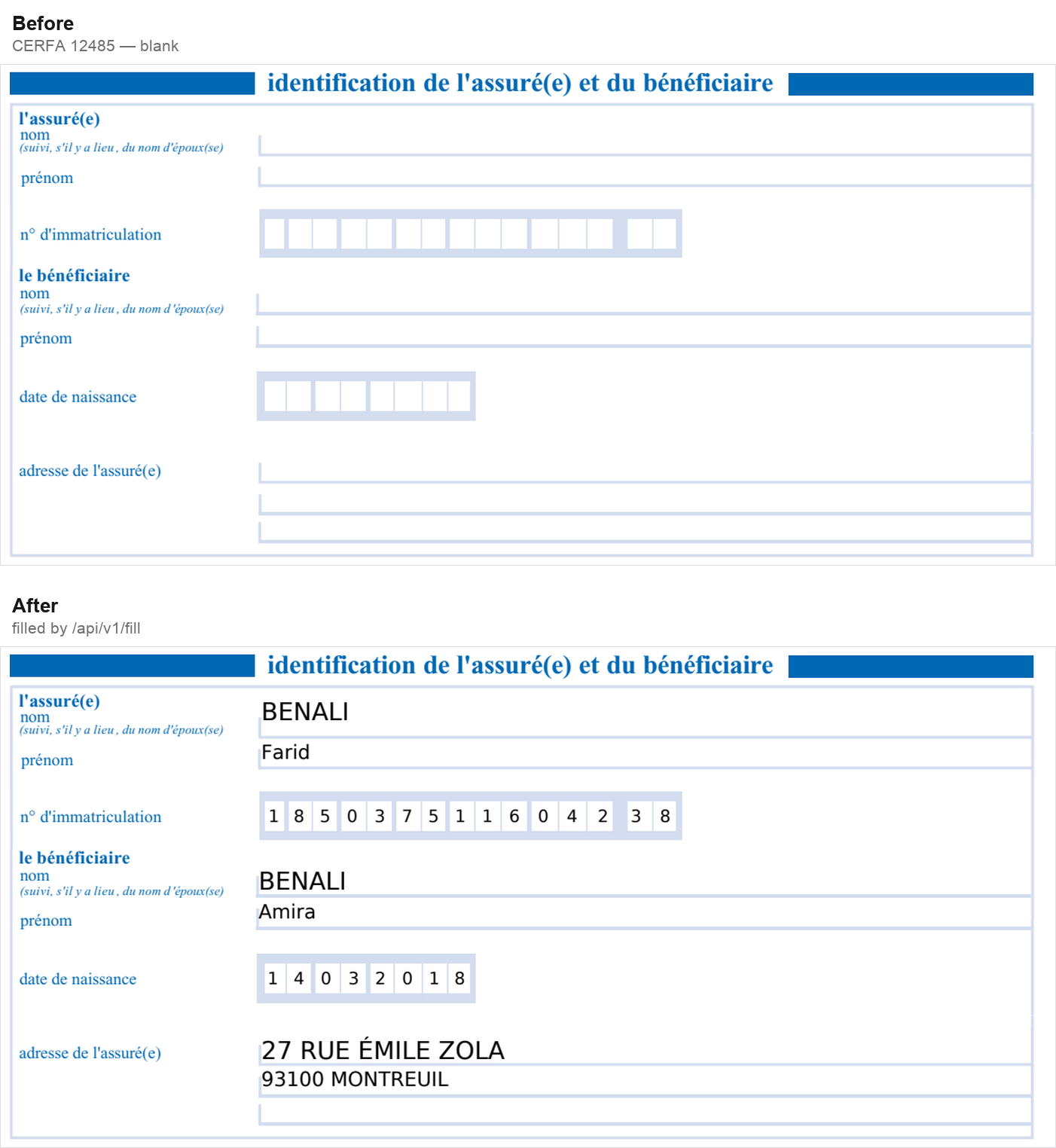
Worth reading the second line of that form: inscrire les chiffres lisiblement — un chiffre par case. Nobody passed that rule to the API. It is printed on the page, in French, and it is enforced: the insurance number arrives as 1 85 03 75 116 042 38 and the date as 14/03/2018, and both have their separators stripped so exactly one character lands in each printed box, measured against the dividers rather than an even division of the row.
That is the difference between filling a form and writing text at coordinates. A form states how it wants to be completed, and those instructions are part of the document.
The problem with the old design
The retired pipeline drew text at specific coordinates. The main issue with this is that there was no easy way to verify on a per-field basis, and adjust/redraw.
Measuring instead of guessing
The new profile gets its geometry from things that can be measured:
- Word positions from the parse. Our parse already returns a bounding box for every word on the page, so we’re able to figure out where to draw form values.
- Blank regions from the page’s own ink. Rules, boxes and cell borders are found by looking at the pixels.
- Placement stated relative to an anchor. We can decide where to write the field values relative to the labels.
For checkboxes, we use a multipass approach where we isolate the region that needs to be checked.
Checking the result
The agent has nine checks it runs against the document it produced:
- every value it claims to have placed is visibly present in the region it was meant for
- every value sits on the line, or in the box, it was written into
- no ink landed outside the declared regions
- the original document survived — nothing erased
- no two options selected within one exclusive group
- every value written traces back to your data (nothing invented)
- every key you sent is accounted for, filled or explicitly not
- values all in the correct boxes
- values neatly inside the boxes
The second one is newer than the rest, and it exists because of a gap the others could not see. A value can be present in its region, traceable to your data, and inside every boundary, while still floating above the line it belongs on — the region a form leaves for a value is usually taller than the value. Every check passed and the page still looked wrong to a person. That one measures each value against the printed rule or cell it went into, so a fill that looks off gets redrawn rather than returned.
Proving it, and what that turned up
We built a benchmark of 22 public government forms — IRS, USCIS and OPM in the US, CERFA in France, the National Tax Agency in Japan, IRCC in Canada.
Across 88 runs on identical inputs with the same scorer:
| agent | previous pipeline | |
|---|---|---|
| placement recall | 0.968 | 0.834 |
| value accuracy | 0.955 | 0.626 |
| forbidden-region violations | 4 | 11 |
Median cost is about $0.03 per form.
As part of this work, we also found and fixed several bugs:
Per-character cells got multi-character chunks. A French insurance number on CERFA 12485 is 15 separate single-character boxes. The old pipeline wrote '3 7' and '75 1' into boxes meant for one character each. The agent splits them correctly.
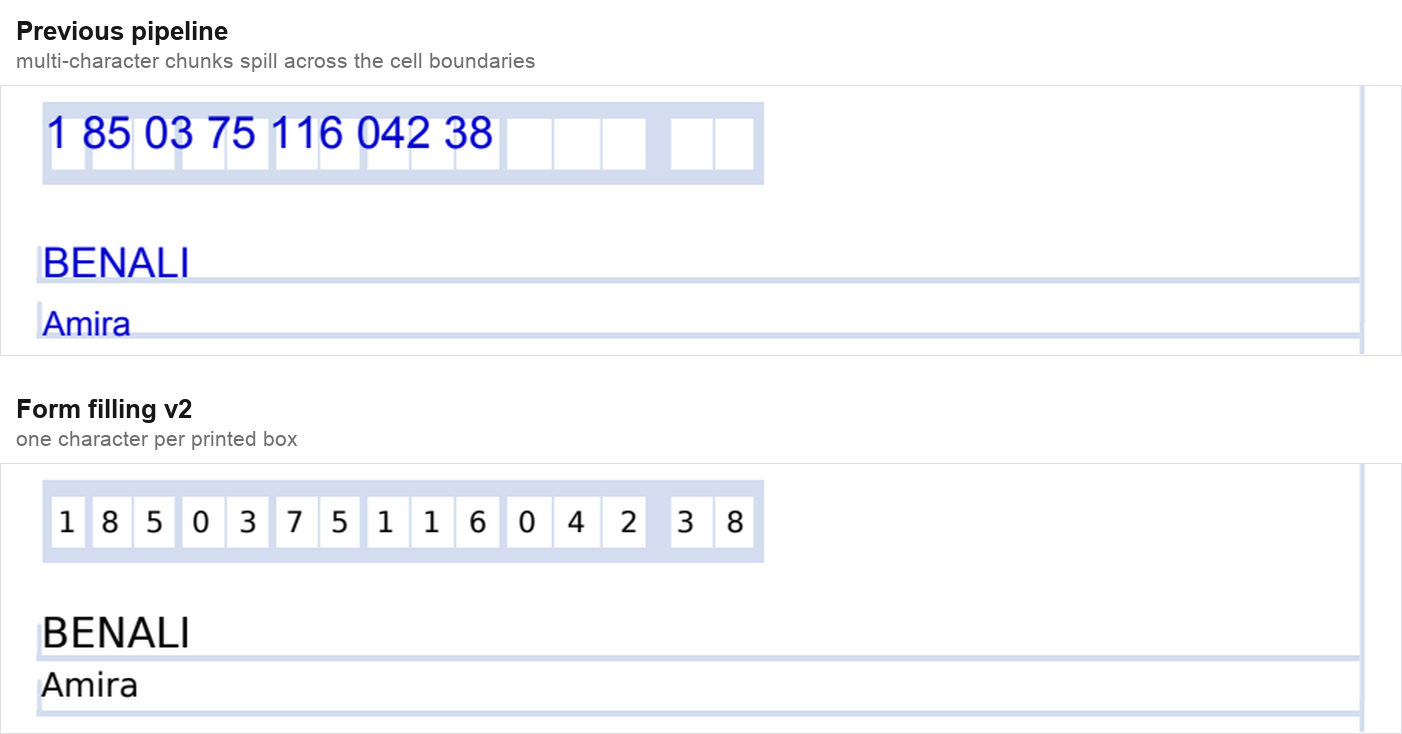
Both panels are the same form and the same input data, run through each pipeline.
Continuation sheets were being filled. On the I-765, the old pipeline wrote the applicant’s name into Part 6, “Additional Information” — a page used only if you need extra space — for a sheet with no content.
Forms with no text layer
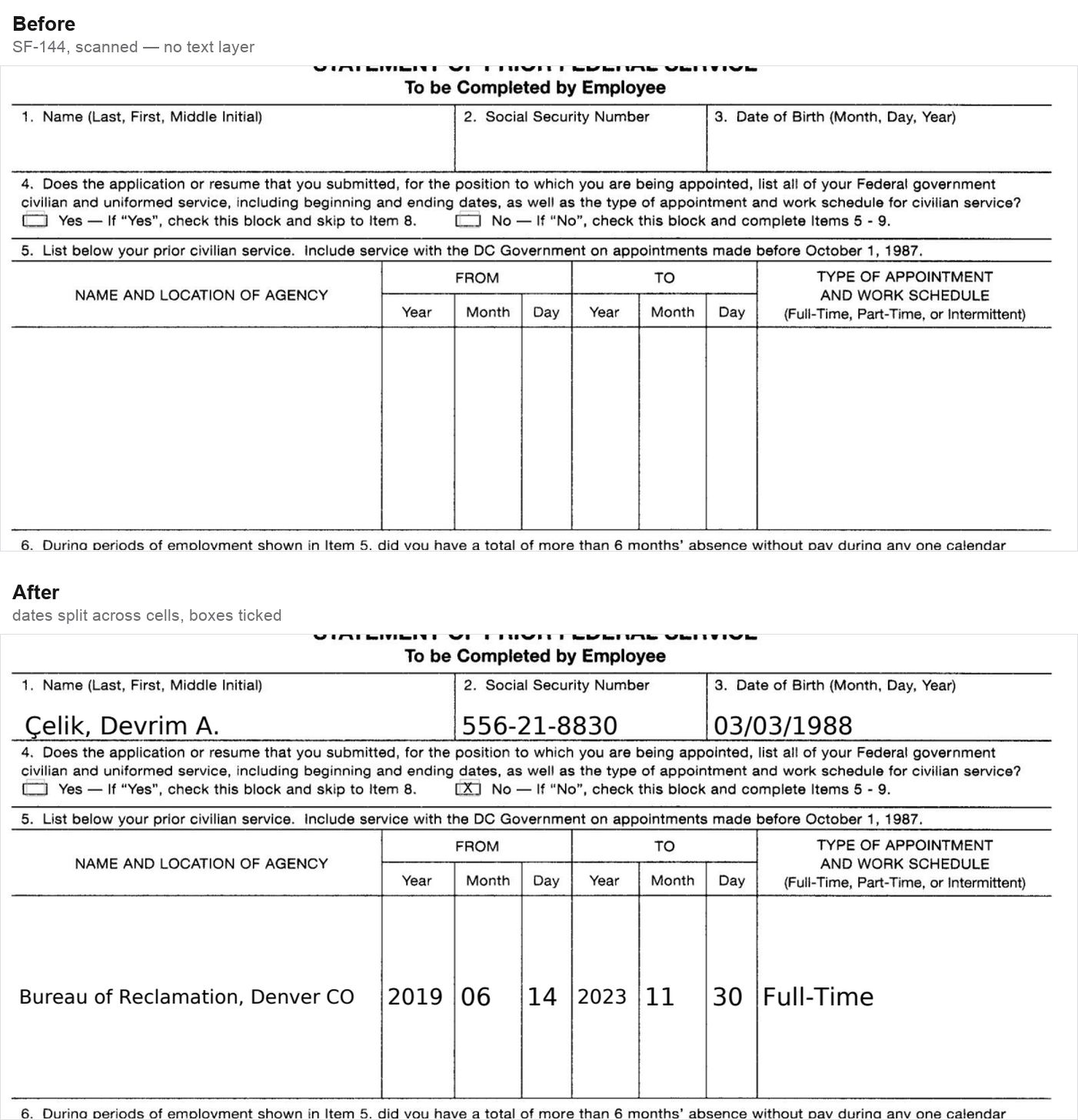
None of this depends on the form being digital. A scan has no text layer and no form fields, so every position has to come from the pixels. This is SF-144 rasterised, filled from the same API call — note the dates broken across the Year / Month / Day cells and the two boxes ticked:
Using it
Nothing to change. POST /api/v1/fill with your document and field_data as before.
field_data maps your own key to a value and an optional description. The description is what disambiguates a field when a form has several plausible homes for it, so it is worth writing:
from datalab_sdk import DatalabClient
from datalab_sdk.models import FormFillingOptions

client = DatalabClient()

field_data = {
    "insured_last_name":  {"value": "BENALI", "description": "Surname of the insured person"},
    "insured_first_name": {"value": "Farid",  "description": "First name of the insured person"},
    "insurance_number":   {"value": "185037511604238", "description": "n° d'immatriculation"},
    "child_last_name":    {"value": "BENALI", "description": "Surname of the beneficiary"},
    "child_first_name":   {"value": "Amira",  "description": "First name of the beneficiary"},
    "child_dob":          {"value": "14032018", "description": "Beneficiary date of birth, DDMMYYYY"},
    "address":            {"value": "27 rue Émile Zola, 93100 MONTREUIL",
                           "description": "Address of the insured person"},
}

options = FormFillingOptions(
    field_data=field_data,
    context="Declaring a treating physician for a child",
)

result = client.fill("cerfa-12485.pdf", options=options)
result.save_output("cerfa-12485-filled.pdf")

print(result.fields_filled)     # keys that reached the page
print(result.fields_not_found)  # keys that did not, and why it is worth reading
That is the call that produced the French form above.
Nesting works, and flattens to the keys the report speaks — {"employee": {"name": {...}}} comes back as employee.name, and a list of blocks as documents[0].title. That is useful when a form repeats a block, as the I-9 and the 2848 do.
Straight HTTP, if you are not using the SDK. The endpoint is submit-and-poll: it returns a request_id and a request_check_url, and you poll that URL until status is complete.
curl -X POST https://www.datalab.to/api/v1/fill
  -H "X-Api-Key: $DATALAB_API_KEY"
  -F "[email protected];type=application/pdf"
  -F 'field_data={"insured_last_name": {"value": "BENALI", "description": "Surname of the insured person"}}'
  -F "context=Declaring a treating physician for a child"
The completed response carries the filled document inline as base64, alongside the two lists:
{
  "status": "complete",
  "success": true,
  "output_format": "pdf",
  "output_base64": "JVBERi0xLjcKJc...",
  "fields_filled": ["address", "child_dob", "child_first_name", "..."],
  "fields_not_found": []
}
An image in gives an image back — output_format tells you which you got, because a form is a document someone files and changing its type breaks that.
Read fields_not_found — every key you send comes back in one list or the other, so a value that could not be placed is reported rather than written somewhere plausible. confidence_threshold is still accepted but no longer does anything: it thresholded a confidence number the old pipeline asked a model to invent about its own work. Checking the document that came out is a better question than asking a model how it felt about the document going in.