
We’re releasing a new processing pipeline: PDF to JATS XML. It takes a raw scientific paper PDF — including scans of decades-old print journals — and produces DTD-validated JATS 1.2 XML, along with the figure images the XML references and a conformance verdict for the run.
It’s powered by Chandra plus a set of models and tools orchestrated by a harness we built for exactly this kind of long-running, verifiable document work.
Today, getting to JATS is mostly a human process. Publishers hand PDFs to a conversion vendor, where people tag the article, chase down the metadata, structure the references, and QA it back — billed per page, at published rates of around $1-2. It’s slow, detailed work: a competent editor with bibliographic databases in front of them still needs five to twenty minutes to process a single reference by hand, and even a modest back catalogue becomes a project measured in months. That’s a large part of why so much of the scholarly record is still sitting in scans — the article exists, but nothing downstream can read it.
This pipeline does the same work end to end and returns an article in minutes rather than hours or days — the same output contract whether you’re publishing this week’s issue or digitising fifty years of back issues.
What JATS actually asks for
JATS (Journal Article Tag Suite) is the XML standard for exchanging and archiving scholarly articles. It’s what PubMed Central ingests, what publishers hand to typesetters, and what most digital preservation workflows expect. The standard specifies the elements and attributes that describe an article’s text, structure, and graphics — and, critically, it requires the article’s metadata to be parsed out and placed correctly, not just the prose.
A conformant article is roughly this shape:
<article article-type="research-article" dtd-version="1.2">
  <front>
    <journal-meta>    <!-- journal title, ISSN, publisher -->
    <article-meta>    <!-- title, authors, affiliations, DOI, volume,
                           issue, page range, pub date, history dates,
                           abstract, keywords, funding, permissions -->
  </front>
  <body>              <!-- <sec> hierarchy, <fig>, <table-wrap>,
                           <disp-formula> with MathML, <xref> links -->
  <back>              <!-- <ref-list> of <element-citation>, <fn-group> -->
</article>
Every slot has rules. Author surnames and given names split apart and linked to affiliation IDs. Each citation decomposed into <element-citation> with its authors, year, title, source journal, volume, and pages as separate elements. Every in-text (3) or Fig. 1b an <xref> whose rid resolves. Display equations as well-formed MathML. Figures with a label, caption, alt text, and a real image file behind the <graphic> href. All of it surviving DTD validation, which is unforgiving about element ordering.
The rules are strict because everything downstream reads the tags rather than the prose. Repositories like PMC validate on ingest and reject packages that don’t conform. Indexing and discovery run off <article-meta>, so a missing date or ISSN is an article that doesn’t surface. Citation graphs and reference linking are built from <element-citation> identifiers — an unresolved DOI is a citation that connects to nothing. MathML keeps equations searchable and screen-readable instead of frozen into images, and alt text is what makes the package accessible at all.
The challenge
A PDF has none of this. A scanned PDF has less than none — it’s pixels. Everything JATS requires has to be recovered from how the page looks:
- Metadata hides in the page furniture. Journal and volume in the running head, submission dates in six-point type, the corresponding author in a daggered footnote. None of it is labeled.
- References need matching, not just parsing. A citation has to come apart into structured fields and be matched against a real record to recover its DOI. That match is fuzzy — abbreviated journal names, OCR’d page ranges, truncated author lists — and a confident wrong match is worse than no identifier at all.
- Cross-references are just characters.
(3),[3–5],Tables 4 and 5— each has to resolve to a real target, and ranges have to expand. - Scanned pages carry their neighbours. A page often holds the tail of the previous article or the start of the next, and telling them apart needs the image, not the text.
How we solve this
Parse first, then arrange. Chandra gives us a highly accurate, layout-aware read of every page. That content becomes verbatim JATS leaves — paragraphs, headings, equations with MathML, tables, cropped figures — and the model’s job is to arrange them to satisfy the spec: section hierarchy, float placement, which markers link to which targets, what belongs to a neighbouring article. Because it only moves blocks copied off the page, it can’t paraphrase a result or invent a sentence.
Front matter is extracted, not written. Title, authors, affiliations, ISSN, submission dates and the rest come out of the parse as a structured extraction, each value carrying a citation back to where it appeared on the page — so every field is checkable against the source. If a value isn’t printed, it stays empty. Nothing is invented to satisfy a check.
References get resolved. Each citation is split out, structured into its fields, and matched against public bibliographic sources for its identifiers. Candidates are gated before they’re accepted, so a near-miss on a common title doesn’t become a wrong DOI in your archive.
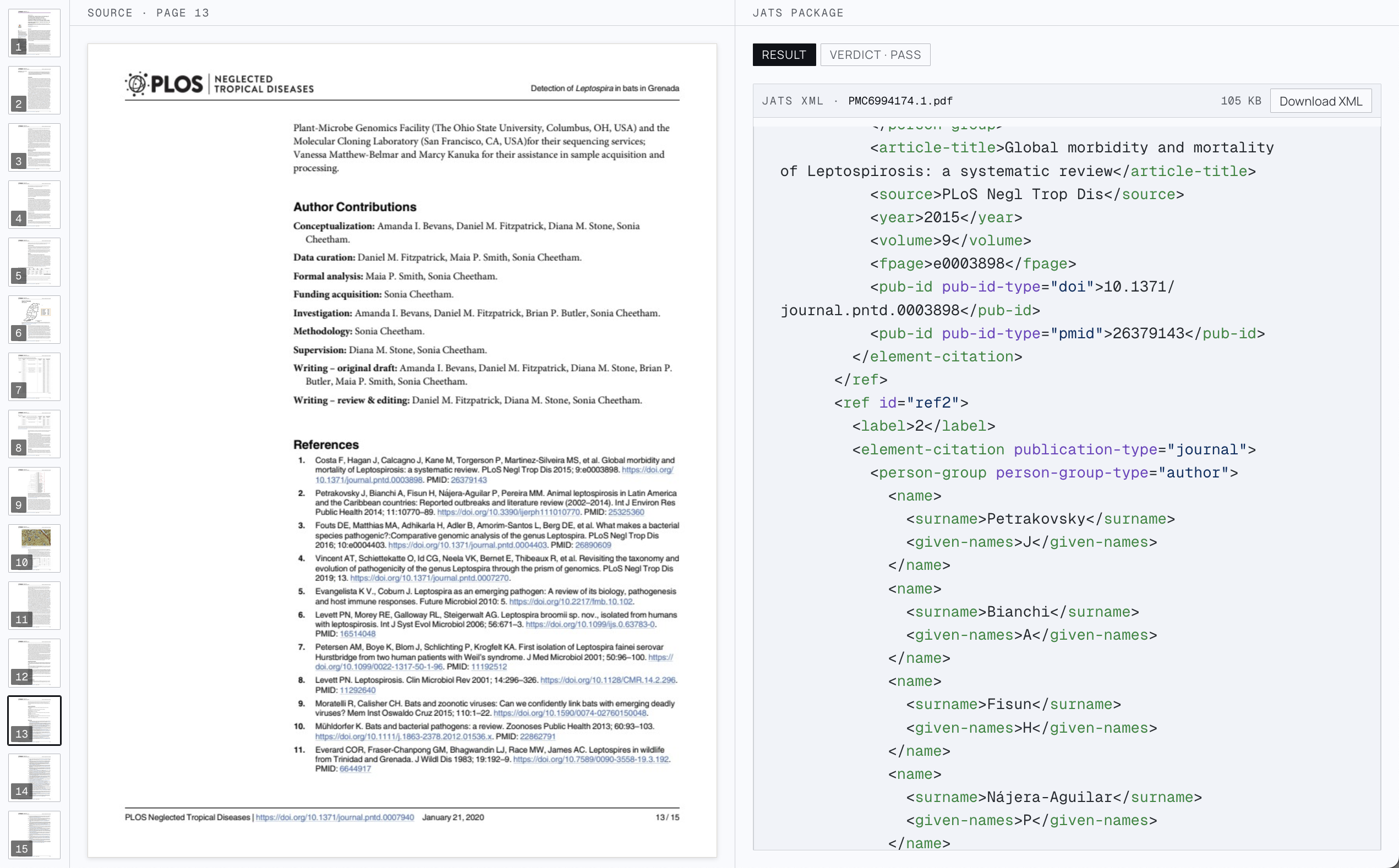
A numbered reference list becomes <element-citation> — names split, source, year, volume, and identifiers each in their own element
Then it gets verified. This is the part we spent the most time on. Every run is checked on two axes before it’s allowed to finish:
- Conformance — DTD 1.2 validity, JATS4R Schematron,
@iduniqueness andxref/@ridresolution, figure assets present with distinct alt text, well-formed MathML. - Fidelity — every source text block traceable into the output, tables not collapsing, floats and footnotes actually referenced, and model judges comparing the abstract and per-page content against the printed pages.
Findings feed back and the article is reassembled — a run doesn’t finish just because the XML parses. Checks are blocking or advisory, so a stylistic warning doesn’t fail a package while a structural break does.
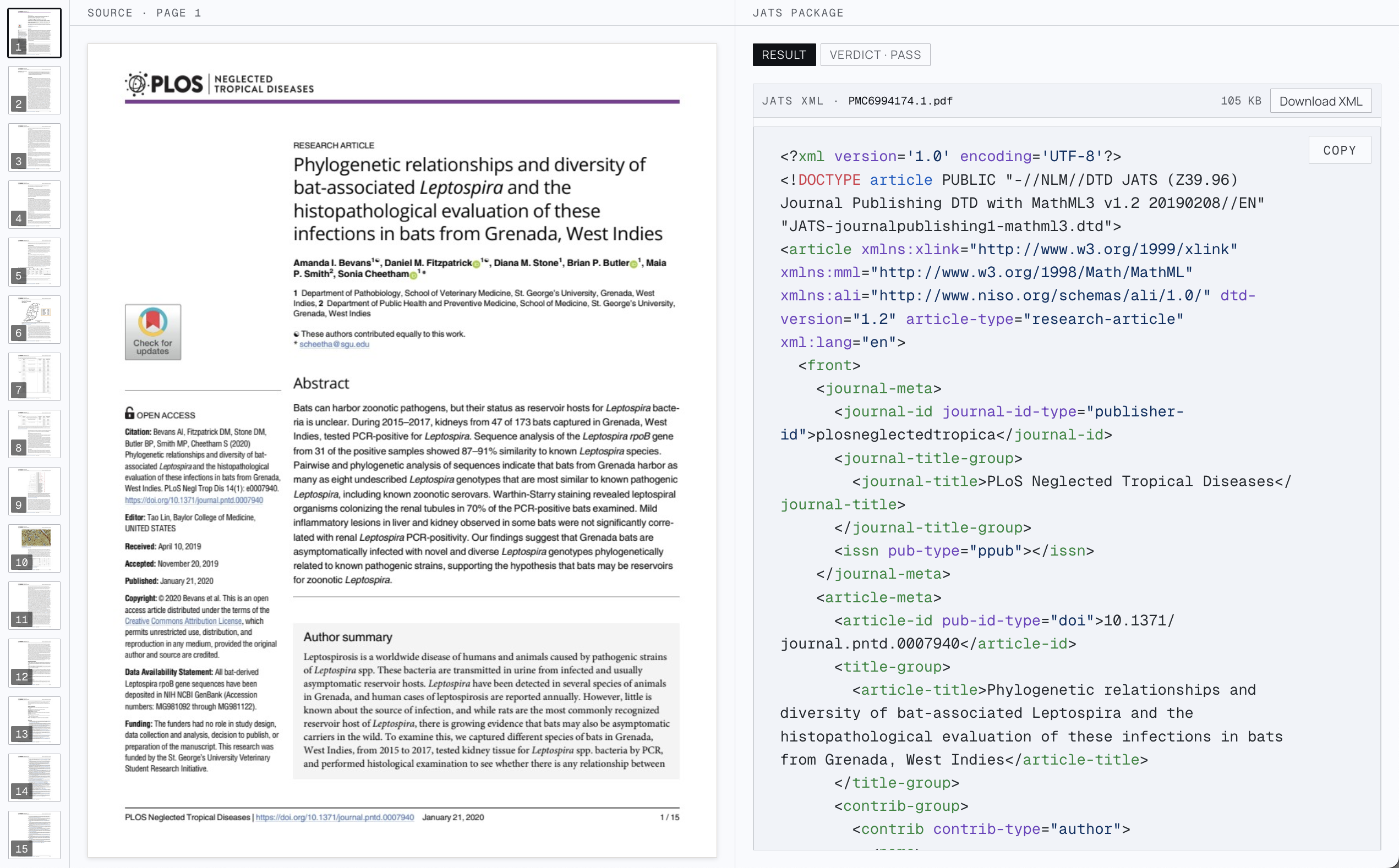
The source page next to its JATS package. Journal title, DOI, and the article title come straight off page one.
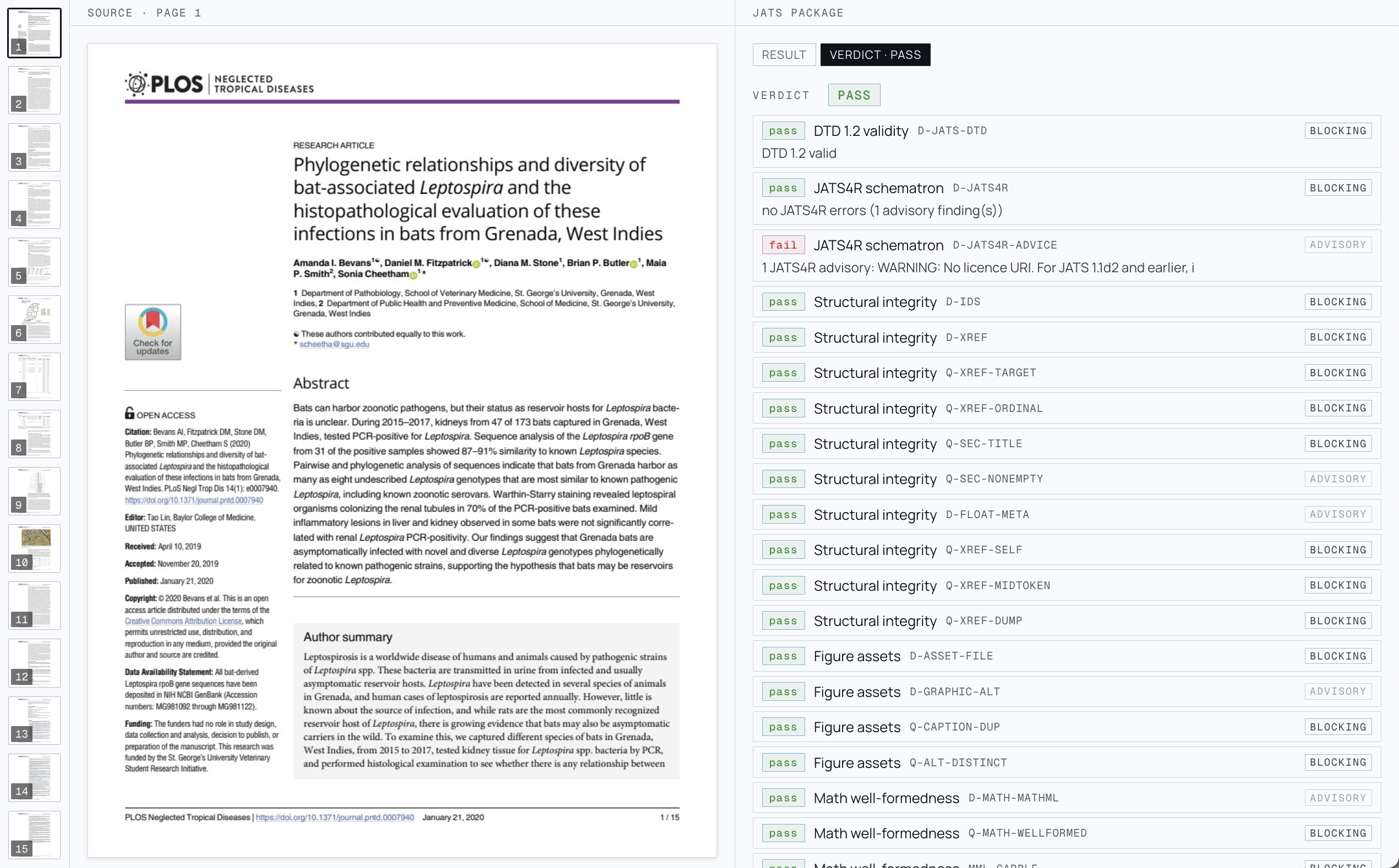
The scorecard behind the verdict. This run passes with one advisory JATS4R finding - not a blocking check for conformance
Get started
The fastest path is the UI: open the JATS processor, drop in a PDF, and inspect the run — output, verdict, and the trace of how it got there.
To call it from the API:
curl -X POST https://www.datalab.to/api/v1/agent
  -H "X-Api-Key: $DATALAB_API_KEY"
  -F [email protected]
  -F "processor=jats"
A bare processor=jats runs the newest published version. Pin it as jats@<version> — the processor page shows the exact address — and that contract never changes under your integration. Then poll the returned request_check_url until the status is complete:
import os, time, requests

headers = {"X-Api-Key": os.environ["DATALAB_API_KEY"]}
resp = requests.post(
    "https://www.datalab.to/api/v1/agent",
    headers=headers,
    files={"file": open("paper.pdf", "rb")},
    data={"processor": "jats"},
).json()

while True:
    result = requests.get(resp["request_check_url"], headers=headers).json()
    if result["status"] == "complete":
        break
    time.sleep(5)

print(result["verdict"])
open("paper.jats.xml", "w").write(result["jats_xml"])
Pass return_images=true to get the figure crops back inline as base64, and verification_effort (fast, balanced, or accurate) to trade run time against how much of the verification battery runs — the model judges join at the higher tiers.
If you need a different JATS flavour — the Archiving tag set instead of Journal Publishing, a house DTD, a publisher-specific profile — or you have an adjacent publishing workflow you’d like built the same way, email us at [email protected].