
Today we’re launching turbo mode for the Datalab extraction API: structured JSON from any document at a median of ~12 seconds per document, for $6 per 1,000 pages.
Turbo is built for one job: when you need to turn a document into clean JSON, aligned to a schema, quickly. This matters for realtime user-in-the-loop flows, or for batch jobs that are less accuracy sensitive.
Lift model for extraction
Turbo is powered by lift, our new extraction model, which fills your JSON schema directly, with no external LLM calls. Here we compare it to our fast and balanced modes.
| Mode | Field accuracy | Full-doc accuracy | Correct nulls | Median latency* | Output | Price /1k pages |
|---|---|---|---|---|---|---|
| Turbo | 89.8% | 23.6% | 83.9% | ~12s | JSON | $6 |
| Fast | 91.6% | 25.3% | 85.8% | ~29s | JSON + citations | $10 |
| Balanced | 95.9% | 44.4% | 95.4% | ~54s | JSON + citations + verification | $35 + fees** |
* End-to-end per document, including document parsing where the mode requires it. Measured at 8 concurrent requests on our 225-document benchmark — ~6,600 pages of invoices, bank statements, medical guidelines, legal filings.
** Balanced adds a compute surcharge on complex schemas — none for most documents, typically $0–$2 when it applies.
See it work
Here’s a real one-page invoice — a scanned services invoice with a line-item table, serial numbers, and the usual layout noise.
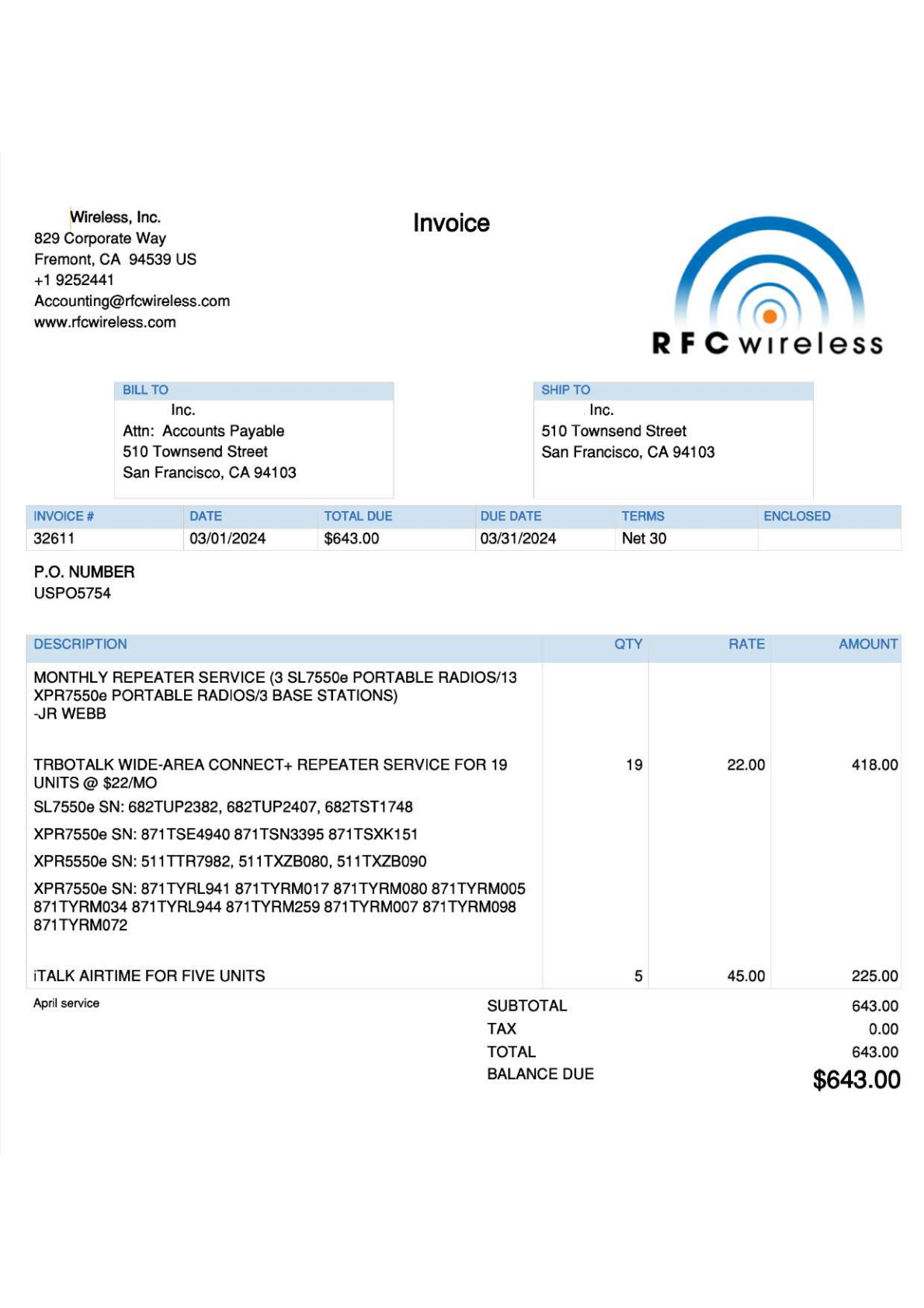
Define the schema you want back:
{
  "type": "object",
  "properties": {
    "vendor": {
      "type": "object",
      "properties": {
        "name": { "type": "string" },
        "email": { "type": "string" },
        "phone": { "type": "string" }
      }
    },
    "invoice_number": { "type": "string" },
    "invoice_date": { "type": "string" },
    "due_date": { "type": "string" },
    "po_number": { "type": "string" },
    "payment_terms": { "type": "string" },
    "line_items": {
      "type": "array",
      "items": {
        "type": "object",
        "properties": {
          "description": { "type": "string" },
          "quantity": { "type": "number" },
          "unit_price": { "type": "number" },
          "amount": { "type": "number" }
        }
      }
    },
    "subtotal": { "type": "number" },
    "tax": { "type": "number" },
    "total": { "type": "number" },
    "shipping_cost": {
      "type": "number",
      "description": "Shipping charge, if any"
    }
  }
}
Send the file with extraction_mode=turbo:
curl -X POST https://www.datalab.to/api/v1/extract
  -H "X-Api-Key: $DATALAB_API_KEY"
  -F "[email protected]"
  -F "extraction_mode=turbo"
  -F "page_schema=$(cat schema.json)"
Or from Python:
import json
import time

import requests

API_KEY = "YOUR_API_KEY"
headers = {"X-Api-Key": API_KEY}

with open("invoice.pdf", "rb") as f:
    submit = requests.post(
        "https://www.datalab.to/api/v1/extract",
        headers=headers,
        files={"file": ("invoice.pdf", f, "application/pdf")},
        data={
            "extraction_mode": "turbo",
            "page_schema": json.dumps(schema),
        },
    ).json()

while True:
    result = requests.get(submit["request_check_url"], headers=headers).json()
    if result["status"] == "complete":
        break
    time.sleep(1)

extraction = json.loads(result["extraction_schema_json"])
And get back:
{
  "vendor": {
    "name": "Wireless, Inc.",
    "email": "[email protected]",
    "phone": "+1 9252441"
  },
  "invoice_number": "32611",
  "invoice_date": "03/01/2024",
  "due_date": "03/31/2024",
  "po_number": "USPO5754",
  "payment_terms": "Net 30",
  "line_items": [
    {
      "description": "TRBOTALK WIDE-AREA CONNECT+ REPEATER SERVICE FOR 19 UNITS @ $22/MO SL7550e SN: 682TUP2382, 682TUP2407, 682TST1748 ...",
      "quantity": 19,
      "unit_price": 22.0,
      "amount": 418.0
    },
    {
      "description": "iTALK AIRTIME FOR FIVE UNITS",
      "quantity": 5,
      "unit_price": 45.0,
      "amount": 225.0
    }
  ],
  "subtotal": 643.0,
  "tax": 0.0,
  "total": 643.0,
  "shipping_cost": null
}
A few things worth noticing:
- The table comes back as data. Quantities, rates, and amounts land in
line_itemsas numbers (19 × $22.00 = $418.00) — including the serial numbers buried in the description rows. - The nulls are real nulls. There’s no shipping charge anywhere on the invoice, so
shipping_costcomes backnullinstead of a plausible-looking wrong value. The schema grammar explicitly allowsnullfor every field, so the model is never forced to invent. - No templates, no field mapping. The schema is the whole configuration — change it and the same document yields a different extraction.
What you trade
Turbo gives up two things relative to fast and balanced:
- No citations. Fast and balanced return block-level citations pointing each value back to its location in the document. Turbo returns the JSON only.
- A couple of points of accuracy. 89.8% field accuracy vs 91.6% (fast) and 95.9% (balanced).
If you need an audit trail, or you’re extracting from documents where every field matters, use balanced. If you’re processing a million pages of fairly regular documents and want them quickly, turbo is the right tool.
Turbo mode is available now in the API and the playground. Send a file, get JSON.