
Marker grew to over 37,000 GitHub stars and wide usage across industries. It’s popular because it turns messy PDFs into clean markdown, JSON, and HTML. But it was slower than we liked, and had some accuracy issues on certain types of documents.
So we rewrote it. Marker 2 is faster, fully CPU-compatible, and more accurate. Against comparable pipeline OCR systems it wins on both axes at once: on olmOCR-bench, balanced mode scores 76.0% overall while running over 5× more pages/sec than MinerU’s pipeline backend.
pip install marker-pdf- GitHub
- Hosted API — best-in-class accuracy, free $5 in credits
What made this possible
Marker 2 didn’t come from one change. It came from three pieces of infrastructure we shipped over the last few months, then a rewrite that ties them together.
- Surya OCR 2. We trained and released a 650M-parameter OCR model that tops olmOCR-bench for its size class (83.3%, best under 3B params) and is extremely fast — 5.35 pages/sec on a single RTX 5090. It handles OCR, layout, reading order, and table recognition in one model. Marker calls it only where the PDF text layer falls short.
- A 20M-parameter fast layout model. We trained a lightweight rf-detr layout detector for Surya that runs quickly on CPU. It’s what lets Marker read document structure — columns, tables, headers.
- A rebuilt pdftext. We rewrote Marker’s text-extraction dependency to be 3× faster while keeping the same accuracy. It reads the embedded text layer in the PDF’s true reading order.
We rewrote Marker to read the PDF text layer, and only call the VLM where you actually need it — garbled pages, scans, equations, low-confidence tables. That’s what makes it both fast and accurate, and it’s what lets a single mode scale from CPU-only to full-VLM.
Modes: pick your speed/accuracy tradeoff
Marker 2 gives you three points on the speed/accuracy curve. The right one depends on your documents and your hardware.
| Mode | What it does | Best on | olmOCR-bench |
|---|---|---|---|
| balanced | Surya VLM for layout; re-OCRs a whole page whenever its embedded text is bad; OCRs inline math | GPU | 76.0% |
| fast | Lightweight rf-detr/onnx layout + pdftext; minimal, surgical per-block VLM repair | CPU or GPU | 66.6% |
--disable_ocr | Pure text-layer extraction — no VLM at all | CPU | 43.6% |
In both balanced and fast, tables are reconstructed from the PDF text layer on CPU, and only low-confidence reconstructions fall back to the VLM (balanced uses a stricter bar). --disable_ocr is the pure-CPU path: no inference server is started at all.
New in Marker 2: the mode defaults by device. If you don’t pass --mode, Marker picks balanced on a GPU and fast on CPU/MPS. Override it any time:
marker_single paper.pdf                 # auto: balanced on GPU, fast on CPU
marker_single paper.pdf --mode balanced # force highest quality
marker_single paper.pdf --disable_ocr   # pure CPU, no VLM
Benchmarks
We measure conversion quality with olmOCR-bench, AllenAI’s third-party benchmark: 1,403 PDFs with unit tests covering math rendering, table structure, reading order, headers/footers, and old scans. We report the macro-average across its 8 categories (matching how olmOCR-bench and Chandra report), scored with the official olmOCR-bench checker.
Marker vs. comparable systems
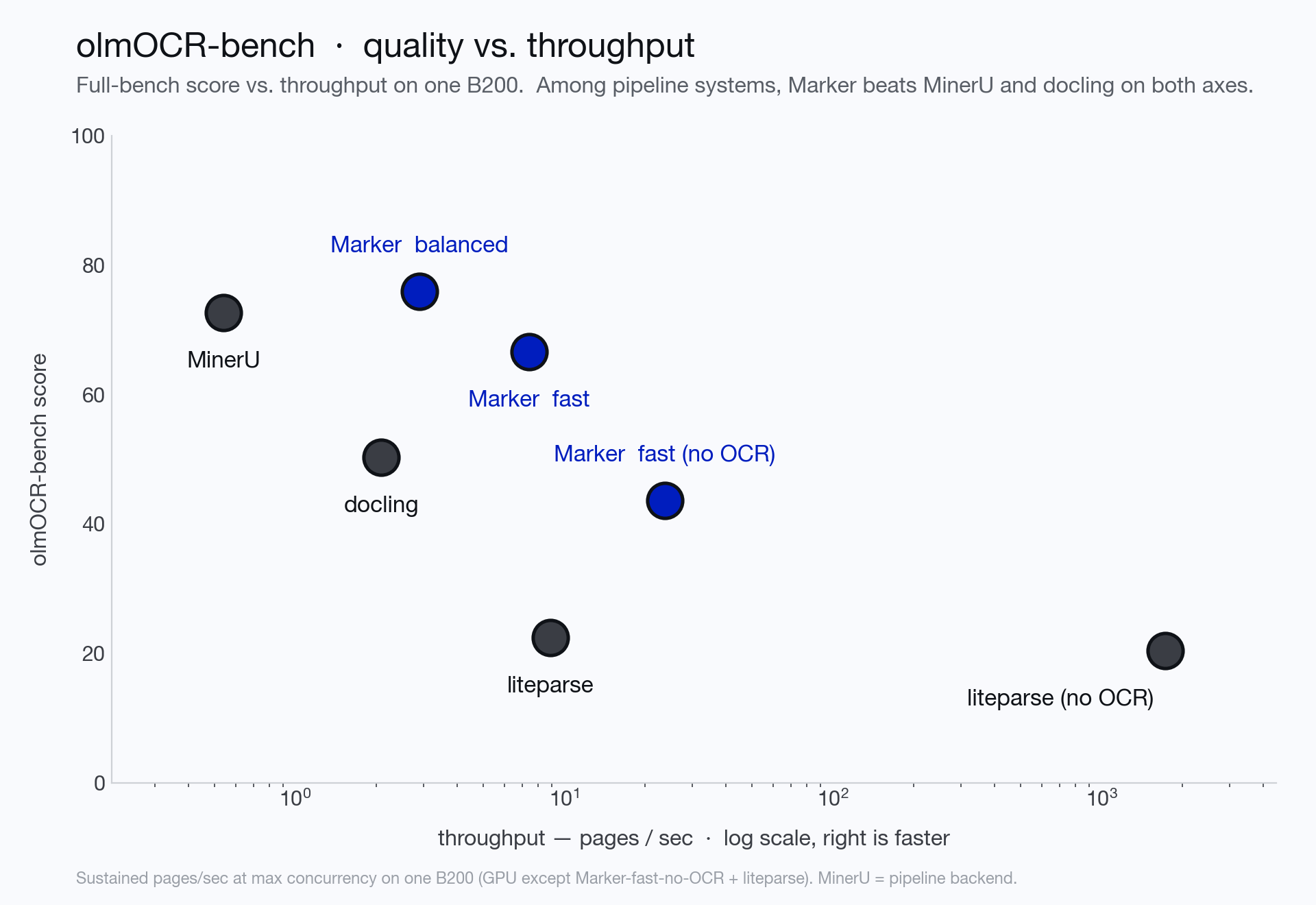
Up (higher score) and right (faster) is better. The clean comparison is against other pipeline systems — tools that read the PDF text layer and OCR selectively — so MinerU’s pipeline backend and docling. Marker balanced leads that group on score and throughput at once.
| System | Overall | Digital-only | Throughput* |
|---|---|---|---|
| Chandra 2 (hosted) | 85.8 | — | — |
| Gemini Flash 3.5 (API) | 76.4 | 79.1 | — |
| Marker — balanced (GPU) | 76.0 | 83.5 | 2.9 pg/s |
| MinerU — pipeline (GPU) | 72.7 | 83.3 | 0.54 pg/s |
| Marker — fast (GPU) | 66.6 | 71.6 | 7.4 pg/s |
| docling (GPU) | 50.3 | 64.0 | 2.1 pg/s |
| Marker — fast, no OCR (CPU) | 43.6 | 55.8 | 23.7 pg/s |
| liteparse (CPU) | 22.4 | 27.3 | 8.9 pg/s |
Marker balanced matches Gemini/MinerU quality while running over 5× more pages/sec than MinerU’s pipeline (2.9 vs 0.54), and fast trades a little quality for a big speedup. This is the apples-to-apples pipeline comparison; MinerU also ships a full-page-VLM backend that scores higher, which is a different approach (more on that below).
Per-category scores
| Category | balanced | fast | no OCR |
|---|---|---|---|
| arXiv math | 83.9 | 23.4 | 0.0 |
| Tables | 73.4 | 69.0 | 46.1 |
| Multi column | 76.6 | 76.0 | 67.0 |
| Headers & footers | 95.9 | 93.2 | 92.8 |
| Long tiny text | 71.3 | 68.3 | 43.2 |
| Old scans math | 63.8 | 59.8 | 0.0 |
| Old scans | 43.2 | 43.2 | 14.3 |
| Baseline | 99.7 | 99.9 | 85.9 |
| Overall | 76.0 | 66.6 | 43.6 |
| Born-digital only | 83.5 | 71.6 | 55.8 |
A couple of things worth noticing. Fast mode’s math is low by design — it reads equations from the PDF text layer instead of VLM-OCRing them, so LaTeX-level math tests mostly miss. Use balanced for math-heavy documents. And --disable_ocr scores zero on math (equations have no text-layer LaTeX) — it’s the pure text-layer path, meant for born-digital documents on CPU.
Born-digital, on CPU
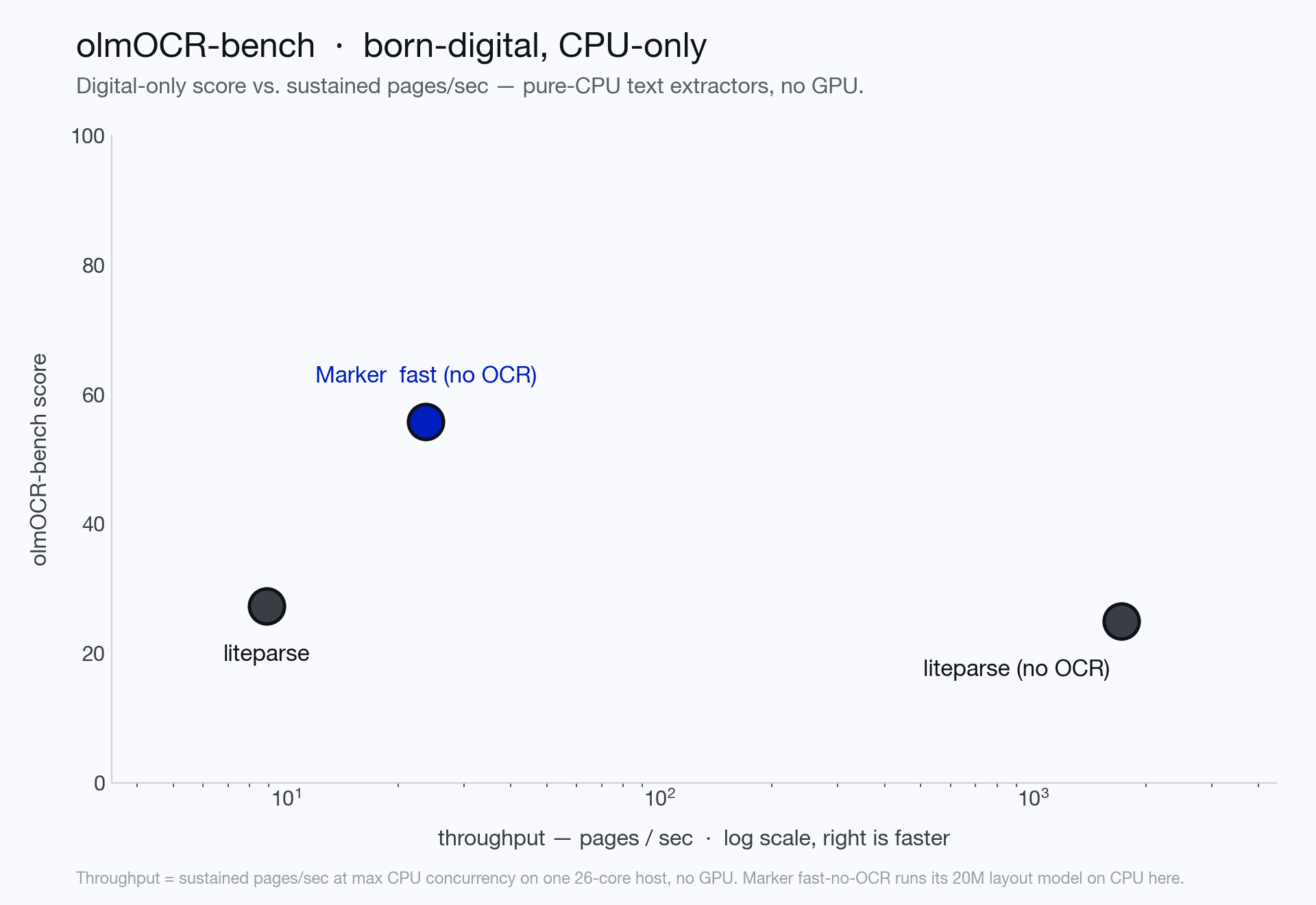
If you only have born-digital PDFs and no GPU, the honest comparison is against pure-CPU text extractors. Marker’s fast --disable_ocr scores far higher than a plain text dump — while staying fast.
Throughput comes from concurrency
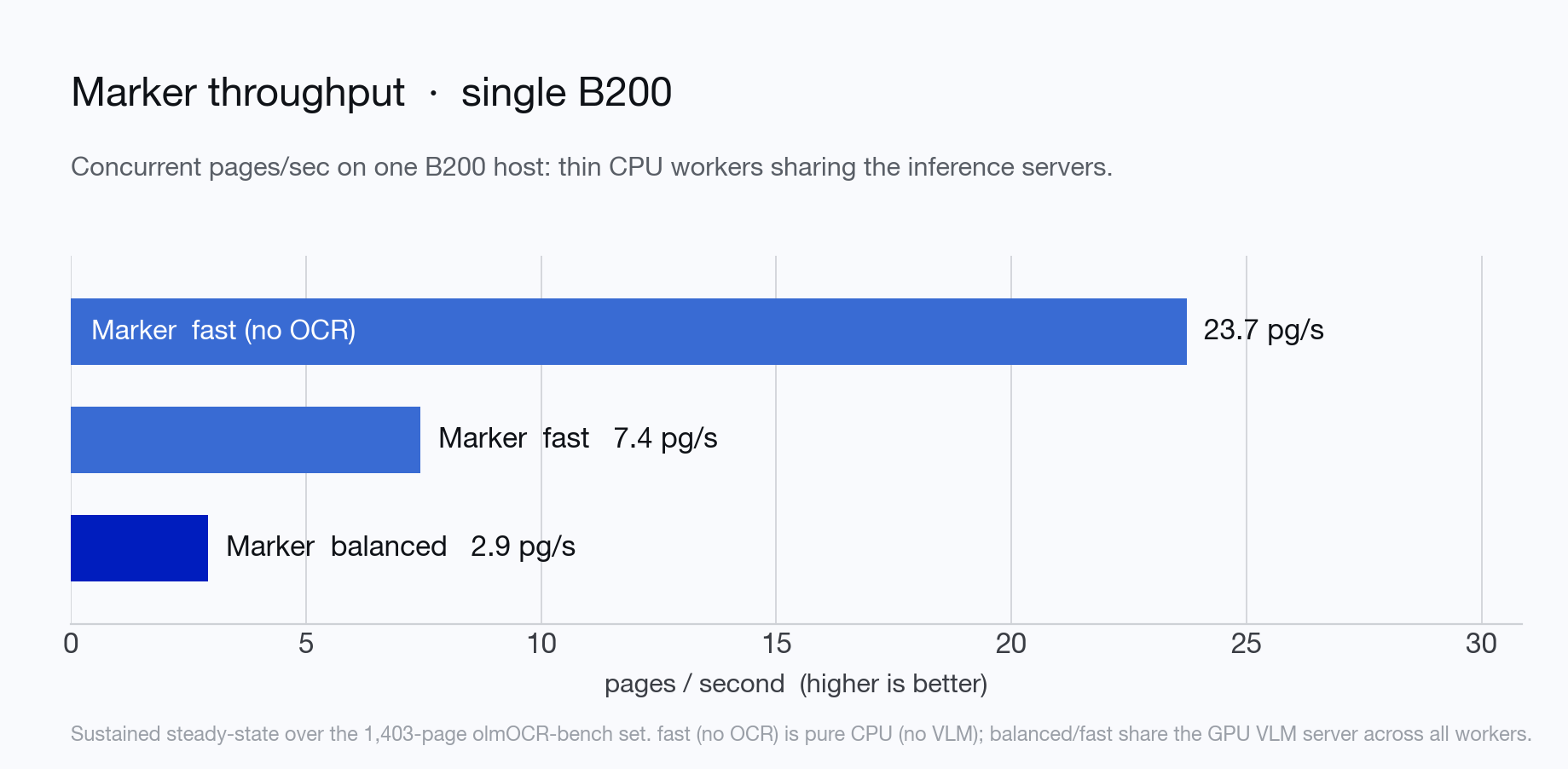
Production throughput comes from concurrency, not per-page latency. Marker runs many thin conversion workers. The parent process budgets VLM concurrency across the workers, so throughput scales with server capacity rather than per-process VRAM.
Sustained steady-state over the full 1,403-page olmOCR-bench set:
| Mode | Throughput | Effective latency/page |
|---|---|---|
| fast, no OCR | 23.7 pg/s | 42 ms |
| fast | 7.4 pg/s | 134 ms |
| balanced | 2.9 pg/s | 341 ms |
fast, no OCR is pure CPU and needs no GPU at all. fast and balanced are GPU-assisted and still leave a single B200 with headroom (balanced saturates only ~30% of it), so throughput scales further with more or larger inference-server replicas.
Using Marker
Convert a single file:
marker_single /path/to/file.pdfConvert a folder — many files at once, sharing one inference server:
marker /path/to/folder --output_dir outFrom Python:
from marker.converters.pdf import PdfConverter
from marker.models import create_model_dict
from marker.output import text_from_rendered

converter = PdfConverter(artifact_dict=create_model_dict())
rendered = converter("FILEPATH")
text, _, images = text_from_rendered(rendered)
A few useful flags:
--mode balanced|fast— override the device default.--disable_ocr— pure text-layer extraction, no VLM (CPU-only).--use_llm— optionally add an LLM (Gemini, Claude, OpenAI-compatible, Vertex, Azure, OpenRouter, or Ollama) to improve tables, math, and forms.--output_format markdown|json|html|chunks— thechunksformat flattens each page’s blocks for easy RAG.--force_ocr— re-OCR everything, for PDFs with bad embedded text.
For batch jobs, the defaults handle a single GPU machine out of the box: one vLLM server, a CPU-sized worker pool, concurrency budgeted to the GPU. Span multiple GPUs with VLLM_GPUS=0,1,2,3, or shard a file list across machines with --num_chunks / --chunk_idx.
Run your own benchmarks
Everything above — both the olmOCR-bench scores and the throughput numbers, for Marker and the competitors — is reproducible with the harness in benchmarks/. We don’t vendor olmOCR-bench; you clone it, run benchmarks/inference.py to convert the bench PDFs at real worker concurrency, score with olmOCR-bench’s own checker, and summarize.
We’d encourage you to do exactly that. Don’t trust vendor benchmarks — including ours. Run Marker on your own documents and see how it does.
When you need more
Marker is a pipeline: it reads the text layer and OCRs selectively. That’s the right tool for most documents, and it’s fast. But if your documents need full-page VLM OCR — heavy math, scans, the highest possible accuracy — that’s a different tool:
- Chandra — our document VLM (85.8 on this bench), available in the hosted Datalab API with automatic correction and zero data retention by default.
- Surya — the OCR VLM Marker uses under the hood, if you want to run full-page OCR yourself.
The Datalab API runs higher-accuracy models without any infrastructure to manage — free $5 in credits to start.