
We’re releasing a new processing pipeline: WCAG accessible PDF. It takes a PDF — including a scan, where the page is nothing but pixels — and returns a tagged PDF that assistive technology can read: a real text layer under the scan, and a full structure tree over it.
Today this is done by hand, at published vendor rates of $5–$25 a page. The bigger cost is time — a day or two for a simple document, one to three weeks for scans and forms — and obligations arrive as a deadline over a whole back catalogue. This pipeline returns a document in minutes, powered by Chandra and the same harness behind our JATS pipeline.
What has to be tagged
WCAG isn’t a file format — it’s a set of success criteria about whether a person with a disability can perceive, operate and understand a piece of content. For a document it comes down to one question: does someone reading with a screen reader, a braille display, or reflowed text get the same content, in the same order, with the same ability to move around it, as someone reading the page with their eyes.
A PDF makes that hard by default. It’s a set of drawing instructions; a scanned PDF is one instruction — paint this bitmap. Neither says “this is a heading” or “this number belongs to that column”. Sighted readers recover that from the layout; a screen reader reads only what the file declares.
PDF/UA-1 (ISO 14289-1) is the part a machine can check: the tagging that carries a document’s structure alongside its appearance. A tagged PDF has a structure tree running parallel to the visual page:
Document
├── H1  "Annual Report"           headings, levels that never skip
├── P                             paragraphs, in reading order
├── L → LI → Lbl + LBody          lists, with the bullet as a marker
├── Table → TR → TH(/Scope) + TD  header cells scoped to a row or column
├── Figure  /Alt "..."            every content image described
├── Formula /Alt + MathML         the spoken form of the equation
├── Note, Caption, Link, Form     footnotes, captions, links, form fields
└── /Lang, /Title, PageLabels, bookmarks
Each tag does a job at read time: headings are what “jump to the next section” moves between, /Scope is why a cell announces as “Q3, Revenue, 41.2” instead of “41.2”, and /Title is why the document announces as “Annual Report” rather than scan_0043_final_v2.pdf.
Most of an accessible PDF is a very good parse
Our convert endpoint already recovers what a tag tree is made of — structure, headings, reading order, tables, content — and tops the benchmarks for it. We’ve also added a bounding box and confidence score for every word, which is what lets us place real text precisely over a scan.
The build is additive: the original page is untouched, wrapped as a pagination artifact — visible to sighted readers, invisible to assistive technology. Over it goes an invisible text layer (render mode 3) positioned word by word, which the structure tree tags. Nothing is re-rendered, so the document can’t come back looking different.
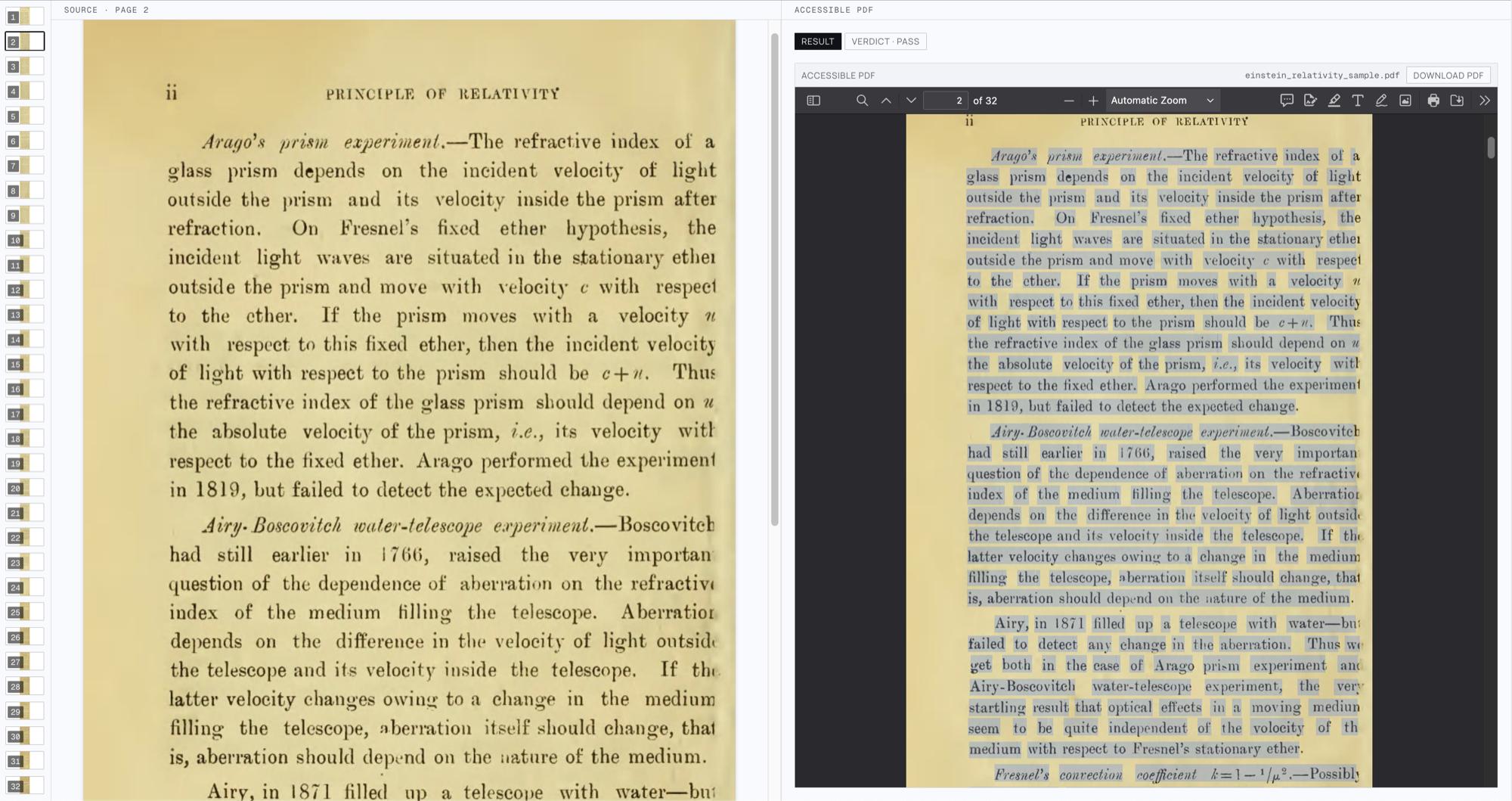
The invisible text layer, selected — a box per word. The running head and folio are artifacts, kept out of it.
The gaps between a good parse and a tagged document are mostly judgment, and that’s the agent’s job. It reads the parse back against the page images, decides what each block really is, and steers the build — correcting a misread, retagging a block, dropping furniture — until the checks clear:
- Alt text grounded in pixels. Figures are cropped and described from what they show; decorative furniture — stamps, barcodes, deckle shadows — is removed rather than described.
- Formulas that can be spoken. A spoken-form
/Altplus MathML where it can be produced cleanly; raw LaTeX read aloud is unusable. - Content merged across pages. A list broken by a page break arrives as two blocks — tagged as two lists, a screen reader announces “list of 3” then “list of 5” for one list of eight.
- Page furniture out of the flow. Running heads and folios become artifacts, but their text is still used: the work’s title usually lives in the running head, and the printed folios become the page labels.
- Printed form fields. On a scan these exist only as pixels. A pixel pass recovers their geometry and anchors each to the label beside it, so a blank announces as “Date of birth, edit” rather than a gap.
Someone using this document reads the text layer we built, and only that layer — it has to hold up on its own.
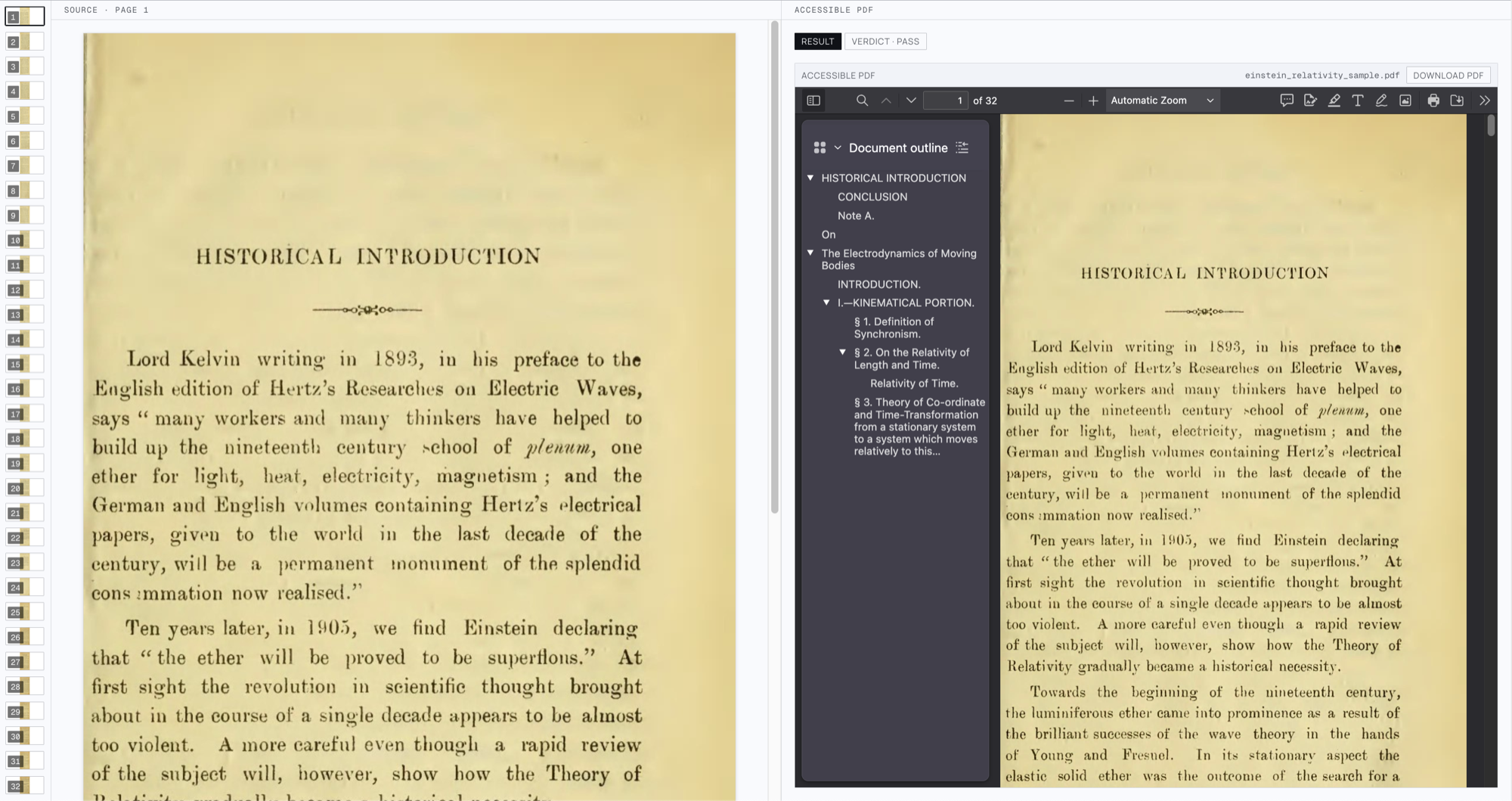
Document tree reconstructed from the parsed document and injected into the PDF’s accessibility tree.
Verifying it
Much of accessibility checking is mechanical, and every check we run is one nobody has to catch downstream. The deterministic battery runs over the built PDF’s actual bytes — veraPDF’s PDF/UA-1 and WCAG profiles, plus our own:
- Figures — alt text present, and not a restatement of the adjacent caption
- Headings — levels never skip
- Tables — cells don’t overlap; header cells scoped to the right axis
- Lists — a list spanning a page boundary stays one list
- Text layer — covers the page, in reading order, positioned where the words sit
- Links — resolve, and are tagged with a description
- Page labels — match the numbers printed on the page
- Forms — every detected field named and tagged
Model judges then read the tagged document against the page images: is the alt text an equivalent, is the reading order natural, is each field named the way the page labels it.
The real test is whether a screen reader can read it, so on the top tier (verification_effort=accurate) we run one. The PDF is opened under a headless session with Orca - a screen reader, and we capture the AT-SPI accessibility tree it consumes — the same layer a real user’s screen reader does. That transcript is what gets judged: does it read end to end, is it navigable by heading and bookmark.
It all feeds back to the agent, which builds, checks, fixes and rebuilds, so what ships is what survived the checks.
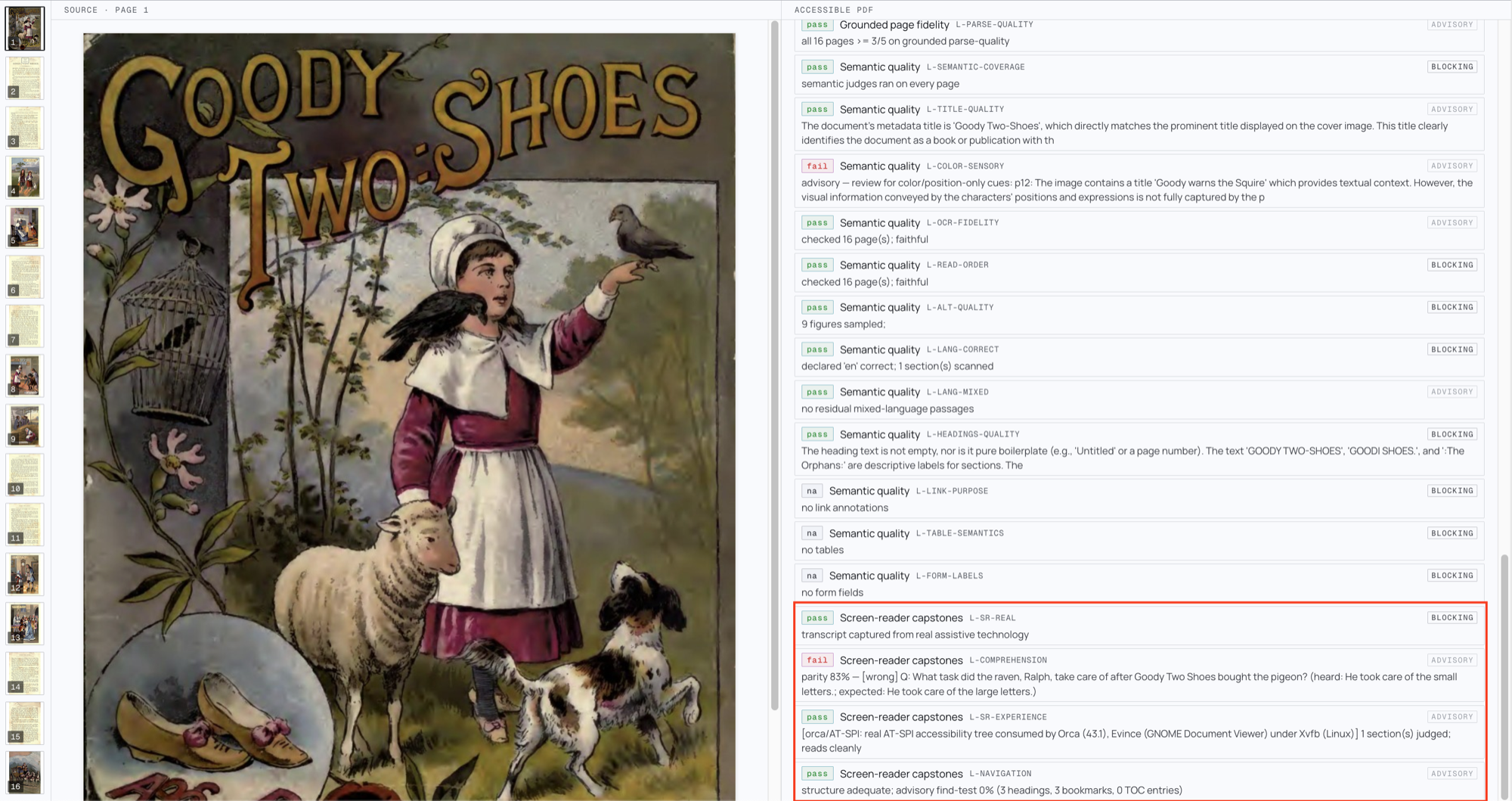
The accurate tier’s verification checks, with the screen-reader capstones highlighted.
Every check reports with its severity, and what you do with a failing one is your policy. You can specify which checks are blocking or advisory, and use the blocking checks to route to human review. A detailed report of each check is returned with every processed result.
Two tiers trade time against depth — fast runs the deterministic battery only, accurate adds the model judges and the screen-reader capstone.
Get started
Open the WCAG processor, drop in a PDF, and inspect the run. Or call it from the API:
curl -X POST https://www.datalab.to/api/v1/agent
  -H "X-Api-Key: $DATALAB_API_KEY"
  -F [email protected]
  -F "processor=wcag"
A bare processor=wcag runs the newest published version; pin it as wcag@<version> to freeze the contract. Then poll the returned request_check_url:
import base64, os, time, requests

headers = {"X-Api-Key": os.environ["DATALAB_API_KEY"]}
resp = requests.post(
    "https://www.datalab.to/api/v1/agent",
    headers=headers,
    files={"file": open("scan.pdf", "rb")},
    data={"processor": "wcag", "verification_effort": "accurate"},
).json()

while True:
    result = requests.get(resp["request_check_url"], headers=headers).json()
    if result["status"] == "complete":
        break
    time.sleep(5)

print(result["verdict"])
open("scan.accessible.pdf", "wb").write(base64.b64decode(result["accessible_pdf"]))
verification_effort takes fast, balanced, or accurate.
If you have a house profile to hit, a downstream validator you’re graded against, or an adjacent workflow you’d like built the same way, email [email protected].